How to Add Login Banner to vSphere Web Client

If you have the pleasure or meeting certain audits or security compliance then having a login banner message on your systems is a pretty common requirement. Sometime ago I detailed how to add a login banner message to ESXi hosts, below I’ll show how easy it is to do the same with your VMware vSphere web client or HTML5 client using vSphere 6.0 Update 2 or better.

Adding a login banner message to vSphere

  1. Open a web browser and go to, https://FQDN-of-VCSA/psc
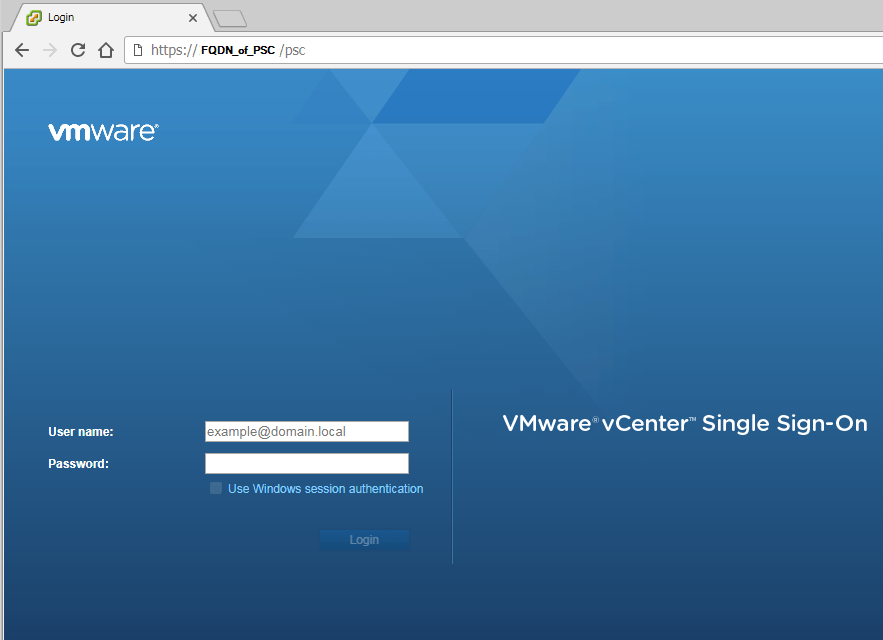
    VMware vSphere login
  2. Next navigate to: Configuration (A) > Login Banner (B) > Edit (C) > enable the checkbox for “Status” as well as “Checkbox Consent” if you wish to force users to accept the message before they can log into the client. Then enter your message/terms.
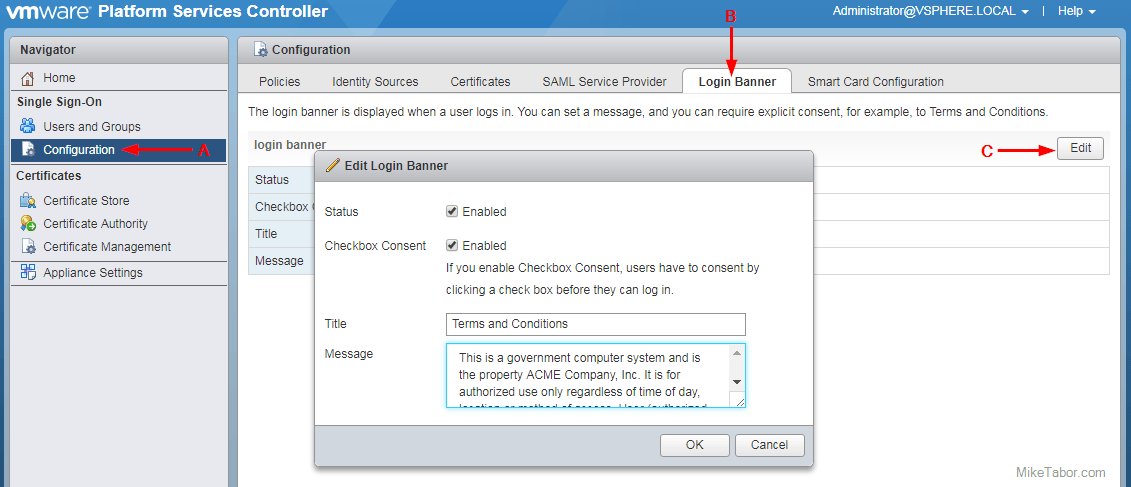
    VMware vSphere login banner message
  3. Finally, click on OK.

Now if you try to log into the VMware vSphere client you’ll see a link for the “Terms and Conditions” and a check box if you did enable the “checkbox consent” option.
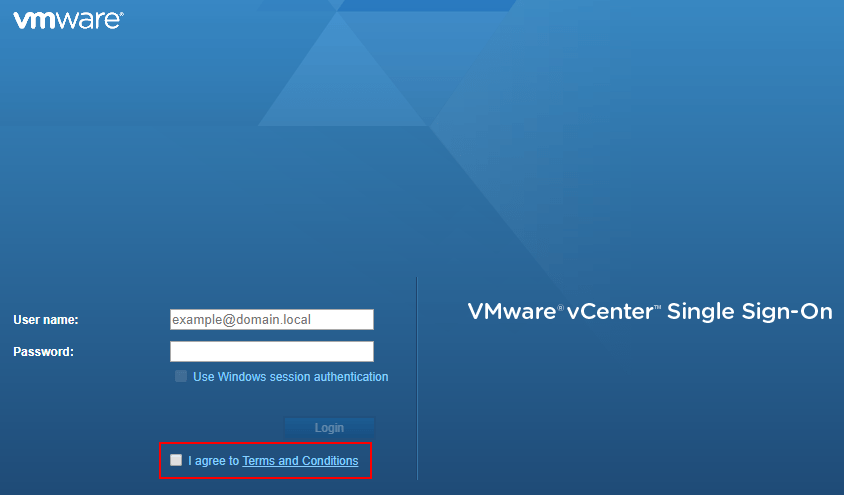
VMware vSphere login checkbox

If you click on the “Terms and Conditions” link you’ll see your full terms/message.
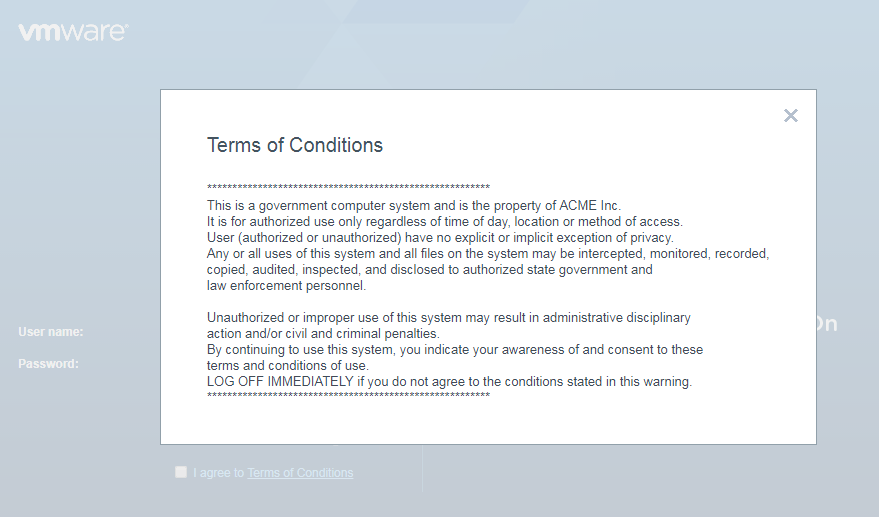
VMware vSphere login message box

It’s as easy as that and now you’ve made a security compliance officer somewhere a little more happy!


Similar Posts

  • How to manually delete NetApp SnapMirror snapshots

    The other day, one of our volumes in the lab environment filled up. This volume has a couple large VM’s on it, coupled with a couple different Veeam backup jobs running using the native Veeam backup methods as well as using NetApp snap mirror to snapshot the volume and then using Veeam to ship it out to Azure.

    At any rate the volume filled up to the point where vCenter wasn’t allowing me to migrate VM’s off the datastore. I really didn’t want to expand the volume just so I could move VM’s off of it.

    Instead, I decided to delete some of the older proof of concept snapshots from SnapMirror. Below are the quick and easy steps to clear up some un-used snapshots and free up some space on the datastore.

    Read More “How to manually delete NetApp SnapMirror snapshots”

  • VMware Certified Professional 6 (VCP6-DCV) now available

    VMware VCP DCV

    VMware has just recently announced that the VMware Certified Professional 6 (VCP6-DCV) is now available. The new VCP6 exam is similar to the others in the past whereas the VCP6 aims to validate your ability to deploy, configure, administer and scale a vSphere virtualized data center, including administering and troubleshooting virtualization technologies such as:

    • vSphere HA and DRS Clusters
    • Storage virtualization using VMFS
    • Storage DRS and Storage I/O Control
    • Network virtualization using vSphere standard and distributed switches and Network I/O Control
    • vSphere management using vCenter Server and vRealize Operations Manager Standard
    • Virtual Machines

    Read More “VMware Certified Professional 6 (VCP6-DCV) now available”

  • VMware Recertification Policy

    VMware certified

    Starting today, March 10 2014, new VCP certifications must be re-certified within two years of it’s earned date. Anyone who currently has their VCP certification prior to March 10 2013 has until March 10, 2015 to re-certify.

    The new policy gives you three options to re-certify:

    1. Take the current exam for your existing VCP certification solution track. For example, if you are a VCP3, you could take the current VCP5-Data Center Virtualization (VCP5-DCV) exam.
    2. Earn a new VCP certification in a different solution track. For example, if you are a VCP-Cloud, you could recertify by earning VCP5-Desktop (VCP5-DT) certification.
    3. Advance to the next level by earning a VMware Certified Advanced Professional (VCAP) certification. For example, if you are a VCP5-DCV you could earn VCAP5-DCA certification.

    I can understand why they are doing this but I don’t agree with the changes. As per the announcement if you let your certification expire, “Your certification will be revoked,and you will no longer be entitled to use the certification logo or represent yourself as VMware certified“. Really? You mean everything that was done prior and after taking the exam means nothing?

    Read More “VMware Recertification Policy”

  • Download VMware vCenter & ESXi 6.0 Update 2

    VMware has released vCenter Server 6.0 Update 2 and ESXi 6.0 Update 2 (build: 3620759) which include a number of new features and fixes. VMware has also released the much anticipate VSAN 6.2 which includes it’s own bunch of new features such as deduplication, compression, QoS, and RAID5/RAID6 Erasure coding.

    Read More “Download VMware vCenter & ESXi 6.0 Update 2”

  • How to easily add an ESXi SSH login message banner

    ESXi issues message

    Preparing for some upcoming audits, I noticed one of the checkpoints was to ensure each ESXi host was configured with a warning banner stating the machine is being monitored and audited when someone logs into the ESXi host via SSH. This type of message is something you see on most any company or government computer before you login.

    There are two message types that can be used to achieve this, the first being login banner (/etc/issue) and MOTD (/etc/motd). The difference between the two are where they are shown. The login banner is shown between the username and password inputs during login, while the MOTD is displayed after a user has successfully logged into SSH.

    Read More “How to easily add an ESXi SSH login message banner”

  • VMUG EVALExperience, the new VMware VMTN

    VMUG EVALExperience

    Long ago VMware offered a program called VMware Technology Network (VMTN) which was very similar to Microsoft’s TechNet, which allowed you to download and run various VMware software within your home lab for a small yearly fee. Just like the Microsoft TechNet, the VMware VMTN program was eventually closed. From the time the VMTN program closed many people have begged and pleaded with VMware to bring the program back, there is even a long forum thread asking VMware to bring VMTN back. Though it never did… until now.

    Read More “VMUG EVALExperience, the new VMware VMTN”

Leave a Reply

Your email address will not be published. Required fields are marked *

2 Comments