VMware’s Dual Persona smartphones now available at Verizon Wireless
VMware Ready for Verizon

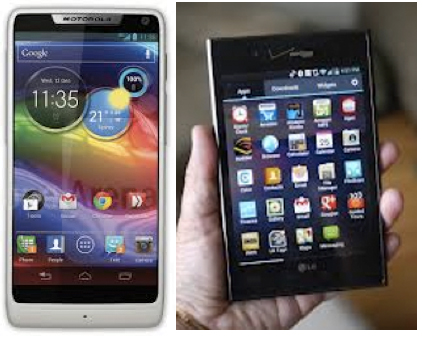
VMware has announced that the Android running LG Intuition and Motorola Razr M can now both be purchased with VMWare Horizon Mobile software. The VMWare Horizon Mobile software separates the devices into isolated partitions that allow users to keep their work applications and data separate from their personal applications and data.

Today, VMware and Verizon Wireless announced that the Android-based LG Intuition and Motorola Razr M can now be purchased with VMware’s Horizon Mobile software, which separates the device into isolated partitions that keep a user’s work applications and data separate from personal stuff. Licenses to Horizon Mobile start at $125 per user and can be purchased through local resellers of VMware and Verizon Wireless.

VMware Horizon Mobile Overview

Perhaps even more profound than the BYOD trend is the change in how employees use their devices. Irrespective of who actually buys or owns the device, the corporation or the user, most employees tend to download personal apps onto these devices – Facebook, Angry Birds, Temple Run, etc. coexist with work email/PIM. It is fair to assume then that most devices will have both personal and corporate content (apps, data and services).

Given that the usage paradigms have changed, IT needs to rethink security and manageability of mobile devices. The old BlackBerry model of locking and wiping the device is no longer in line with how employees use their devices. IT administrators can now leverage VMware Horizon Mobile to isolate personal content from corporate content and only manage the corporate content on the device. The corporate content resides in a “workspace” whose lifecycle and usage is managed by IT. IT can customize what apps are in the workspace and what policies are applied to the workspace, provision the workspace to the user’s device over the air (OTA) and then manage its lifecycle remotely.

If you look at the latest mobile OS market share information, Android is way ahead of other mobile operating systems but if you consider the enterprise subset of that market share, iOS is the dominant platform. One of the reasons for Android not being dominant is its fragmentation, which makes it very difficult for IT to wrap their hands and heads around a comprehensive security and manageability story for Android devices. VMware Horizon Mobile leverages device virtualization to normalize that fragmentation and allows IT to deploy and manage its own Android workspace that looks and behaves the same on any Android device. However, in order to run this solution, you must have a VMware Ready device and hence, the importance of today’s announcement.

If you’re interested you can watch product demo’s here.

VMWare states they will continue to work closely with Verizon Wireless to enable a broad set of new and existing devices to be VMware Ready. Hopefully we can see Samsung and Apple products added to this list soon.

Similar Posts

  • Thank you VMware Community!

    VMware vExpert 2014

    So far, 2014 has been a very rewarding year for a number of reasons, two of which has happened in just a week or two span. First, Eric Siebert (@ericsiebert) announced on March 27th, this years results of the 2014 Top VMware & Virtualization Blog voting. My first year entered into voting and made it to 71st place! A huge thanks goes out to not only Eric but just as much so to everyone who voted for me!

    To top it off, yesterday VMware announced 2014’s first quarter VMware vExpert list. While vExpert isn’t a technical certification or even a general measure of VMware expertise. The VMware judges selected people who were engaged with their community and who had developed a substantial personal platform of influence in those communities. There were a lot of very smart, very accomplished people, even VCDXs, that weren’t named as vExpert this year. VMware awarded this title to 754 people this year and on that list of many impressive names you’ll find yours truly, Michael Tabor!

    I’m both honored and humbled by both lists. It’s a great feeling to be recognized by not only my peers through the voting in the Top vBlog but also by VMware themselves through the vExpert title.

    So again THANK YOU very much to the entire VMware community, a spectacular community indeed, and congratulations to everyone else that made the Top vBlog and vExpert lists!

  • How to install VMware vSphere Update Manager 5.5

    If you don’t already know, VMware Update Manager (aka, VUM) is a tool which allows you to easily automate patching and upgrading VMware hosts as well as virtual machine hardware and VMware tools. It’s a wonderful tool and makes upgrading and patching so much easier and allows you to quickly see how compliant/up-to-date your environment is with the built in pie graph.

    Recently we had some pretty serious array issues which corrupted the VUM database taking Update Manager down. Since we was going to have to rebuild Update Manager I opted to move from Windows Server 2008 to Windows Server 2012, in the steps below I’ll document step by step how to install VMware Update Manager 5.5 on Server 2012 and a separate database.

    Read More “How to install VMware vSphere Update Manager 5.5”

  • How to upgrade vCenter Server Appliance from 5.x to 6.0

    VMware vSphere 6.0 has finally been released as GA on March 12th and with it out of beta I hope to post several “how-to” posts, this being the first on how to upgrade your vCenter Server Appliance from 5.1/5.5 to vCSA 6.0. So lets get started…

    Prerequisites:

    • vCSA 6.0 ISO downloaded and mounted or burned to disc.
    • Installed Client Integration Plugin (located in the vcsa folder on the ISO).

    Read More “How to upgrade vCenter Server Appliance from 5.x to 6.0”

  • Install ESXi 5.1 from a USB Flash Drive

    Many servers already come with a DVD/CD-ROM drive or some kind of ability to virtually mount an ISO image from a network share onto your server to then install ESXi. However, not all do or you just want to have your ESXi image readily available. Here’s a quick step by step instructions on how to use a USB flash drive to install ESXi.

    1. Download ESXi 5.1 from VMware (if you haven’t already) as well as UNettbootin.
    2. Plug in your USB Flash Drive.
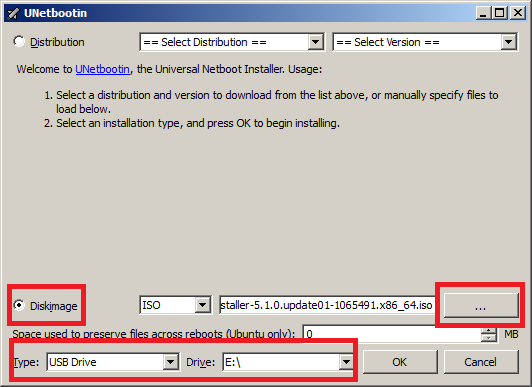
    3. Open UNetbootin and select “Diskimage”, set Type to “USB Drive”, select Drive letter of your USB flash drive, and set the path of your ESXi 5.1 ISO image. Then click on “OK”.
      unetbootin setup
    4. Read More “Install ESXi 5.1 from a USB Flash Drive”

  • Increase incremental backup speed by enabling CBT

    In a recent VMware environment I was working in, we noticed that our incremental backups was taking a long time (like up to 7-8 hours) to complete. After digging around it was found that VMware actually has a feature built-in since version 4 called Change Block Tracking (CBT). CBT will track any blocks that were changed since the last backup and tag them and stores the information in a -CTK file. The obvious benefit is that now the third party software only backs up the changed block and not the entire VM each time, reducing the amount of data being backed thus speeding up backups and even lowers the CPU utilization on the VM host.

    CBT is disabled by default though there are some backup tools that will enable it automatically or you can enable it manually which can easily be done following these steps:

    Read More “Increase incremental backup speed by enabling CBT”

  • How to update VMware ESXi 6.7 to 6.7 Update 1

    To go along with the newly released VMware vCenter 6.7 Update 1 release, comes VMware ESXi 6.7 Update 1 as well.

    As you might expect with an Update 1 release there are a number of patches, fixes and new additions with ESXi 6.7 U1. If you haven’t already seen, check out the release notes here.

    Below are two ways to easily upgrade your ESXi 6.0-6.7 hosts to ESXi 6.7 U1 using the command line or by using VMware Update Manager.
    Read More “How to update VMware ESXi 6.7 to 6.7 Update 1”

Leave a Reply

Your email address will not be published. Required fields are marked *