VMware vCenter Server 5.5b released
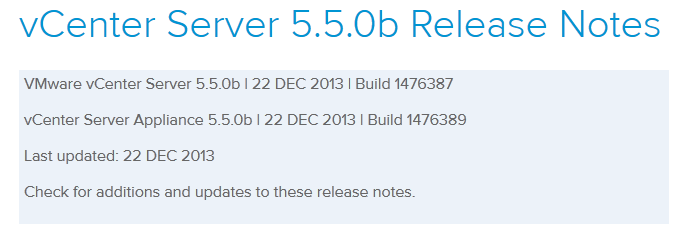
VMware hasn’t let the holidays get in their way and has released vCenter Server 5.5b (Build 1476387) along with vCenter Server Appliance 5.5.0b (Build 1476389). The update includes a number of fixes.
Resolved Issues in 5.5.0b
Upgrade and Installation
- Upgrading the vSphere Web Client to vSphere 5.5 fails with an error
Attempts to upgrade the vSphere Web Client to vSphere 5.5 fails when they are installed in a custom, non-default location. An error message similar to the following is displayed:Error 29107. The service or solution user already registered...
vCenter Server, vSphere Client, and vSphere Web Client
- vCenter Server 5.5 displays a warning message in the yellow configuration issues box on the Summary tab of the hosts
When you connect to VMware vCenter Server 5.5 using the vSphere Client or the vSphere Web Client, the Summary tab of the ESXi 5.5 host displays a warning message similar to the following in the yellow configuration issues box:Quick stats onis not up-to-date - Attempts to export log bundle using the Log Browser fails
When you attempt to export a log bundle using the Log Browser interface, the browser window displays a Secure Connection Failed error page with the following message:Your certificate contains the same serial number as another certificate issued by the certificate authority. Please get a new certificate containing a unique serial number. - Attempts to log in to vSphere Web Client result in an error message
Attempts to log in to the vSphere Web Client result in an error message if the Local OS identity source is not configured in the SSO configuration page. An error message similar to the following is displayed:Failed to authenticate to inventory service:10443
vCenter Single Sign-On
- After installation of vCenter Single Sign-On 5.5 attempts to connect to the vCenter Single Sign-On server might fail
After you install the vCenter Single Sign-On 5.5 on a Windows system that is not domain joined and has multiple network interfaces, attempts to connect to the SSO server from other components might fail. You might see a message similar to the following:Could not connect vCenter Single Sign On....make sure the IP address is specified in the URL. - When upgrading from vCenter Server Appliance 5.0.x to 5.5, vCenter Server fails to start if you select an external vCenter Single Sign-On
If you select an external vCenter Single Sign-On instance while upgrading the vCenter Server Appliance from 5.0.x to 5.5, vCenter Server fails to start after the upgrade. In the appliance management interface, vCenter Single Sign-On is listed as Not configured. - Attempts to upgrade vCenter Single Sign-On to 5.5 fails if the SSL certificates being in PKCS12 format
When you upgrade from vCenter Single Sign-On 5.1 to 5.5, the installer fails and rolls back, before you select an SSO deployment method, with the following error message:vCenter Single Sign-On Setup Wizard ended prematurely because of an errorAn error message similar to the following is logged in the vim-sso-msi.log file:
DEBUG: Error 2896: Executing action ExtractKeystoreInfo failed.This issue is resolved in this release by displaying the following warning message:
Setup has detected a problem with your current configuration which will cause upgrade to fail. Your certificate key store format might be unsupported. See VMware KB 2061404. - Upgrade to vCenter Single Sign-On 5.5 fails before you select the deployment type
Attempts to upgrade to vCenter Single Sign-On 5.5 fail before you can select the deployment type. Error messages similar to the following are logged in the vminst.log file:VMware Single Sign-On-build-1302472: 09/26/13 15:18:19 VmSetupMsiIsVC50Installed exit: Error = 1605 VMware Single Sign-On-build-1302472: 09/26/13 15:18:19 VmSetupGetMachineInfo exit: Error code = 1605 - Active Directory is not added automatically as identity resource in vCenter Single Sign-On
When you initially install the vCenter Single Sign-On in a Windows system that is part of an Active Directory, the Active Directory is not automatically added as the default identity resource in the vCenter Single Sign-On server. - Unable to edit a vSphere 5.5 Identity Source in the vSphere Web Client
You cannot edit a vSphere 5.5 Identity Source in the vSphere Web Client as the Edit icon is disabled for the Active Directory Identity Source. You see a warning message similar to the following:Edit Identity Source (Not available) - Unable to modify password or remove users from system-domain after you upgrade from vCenter Server 5.1 to 5.5
After you upgrade from vCenter Server 5.1 to vCenter Server 5.5, you are unable to remove the users from system-domain or modify the password for these users. - vCenter Single Sign-On Identity Management service repeatedly logs the message: Enumerate trusts failed Failed to enumerate domain trusts for domain_name (dwError – 5)
When you configure the Active Directory (Integrated Windows Authentication) Identity Source in vCenter Single Sign-On, the vmware-sts-idmd.log file, located at C:\ProgramData\VMware\CIS\logs\vmware-sso, repeatedly logs the following message:INFO [ActiveDirectoryProvider] Enumerate trusts failed Failed to enumerate domain trusts for domain_name(dwError - 5)
Virtual Machine Management
- Attempts to clone, create, or storage vMotion a virtual machine fails when the destination data store is a Storage DRS POD
In vCenter Server, operations that consume storage space such as virtual machine creation, cloning, or storage vMotion might fail if the destination data store is a Storage DRS POD and the storage device has the de-duplication feature turned on. The following error is displayed:Insufficient disk space on datastore xxxxx
Check out the full release notes of vCenter Server 5.5.0b here and as always before upgrading be sure to check the VMware Product Interoperability Matrix.

Is it possible to upgrade a vCenter 5.5.0 appliance to 5.5.0b, or do you have to just rip/replace the appliance VM with a new one?
You can update the appliance using the zip bundle, see KB 2003146.