VMware releases patch for glibc vulnerability on ESXi 5.5
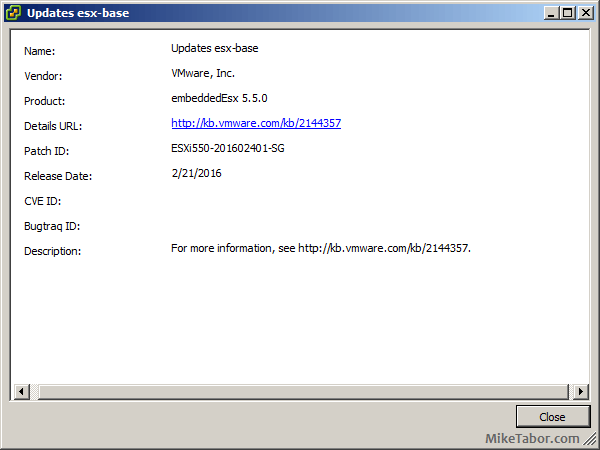
VMware ESXi550-201602401-SG

You may remember not to long ago, the GHOST vulnerability found in glibc, a GNU C library. Well a new glibc vulnerability (CVE-2015-7547) has been discovered and it affects VMware ESXi 5.5 and 6.0 in addition to all versions of VMware virtual appliances running Linux such as vCenter, Orchestrator, vRealize, etc.

VMware has just released patch ESXi550-201602401-SG for ESXi 5.5 and ESXi600-201602401-SG for ESXi 6.0 which fixes the glibc vulnerability, a patch for ESXi 6.0 has yet to be released. VMware has however posted workarounds for affected virtual appliances.

In addition, ESXi550-201602401-SG also fixes two other issues:

  • ESXi hosts might purple screen due to an unresponsive CPU as a result of several CMCIs within a short time. Sample purple diagnostic screen might look like the following:
    cpu1:33127)MCE: 1118: cpu1: MCA error detected via CMCI (Gbl status=0x0): Restart IP: invalid, Error IP: invalid, MCE in progress: no.cpu1:33127)MCE: 231: cpu1: bank9: MCA recoverable error (CE): "Memory Controller Scrubbing Error on Channel 0."cpu1:33127)MCE: 222: cpu1: bank9: status=0xXXXXXXXXXXXXXXXX: (VAL=1, OVFLW=0, UC=0, EN=0, PCC=0, S=0, AR=0), ECC=no, Addr:0xXXXXXXXXXXXXXXXX (valid), Misc:0x8c3589300 (valid)
  • Resolves the issue where virtual machine vMotions would fail when trying to vMotion from an ESXi 5.0 or 5.1 host to an ESXi 5.5 U3b host.

UPDATE: VMware has released ESXi 6 patch ESXi600-201602401-SG which updates the glibc package and patches the glibc vulnerability.

A host reboot will be required to apply the ESXi patches. After applying the patch your ESXi 5.5 host should have a build number of 3568722.

Similar Posts

  • Upgrade VCSA 6.5 to VCSA 6.7 Update 1

    VMware vCenter 6.7 U1 has recently been released. Last week I posted how to upgrade VCSA 6.7 to 6.7 Update 1, this post will walk you though upgrading VMware vCenter Server Appliance 6.5 to VCSA 6.7 Update 1!

    When doing a VCSA version upgrade the upgrade process is much different, than going from say 6.7 to 6.7 U1. When going from 6.5 to 6.7 the upgrade is actually broken up into two stages.

    The first stage involves deploying a brand new vCenter 6.7 appliance. Then the second stage will copy the data from your 6.5 VCSA into the newly deployed 6.7 VCSA from stage 1.

    Read More “Upgrade VCSA 6.5 to VCSA 6.7 Update 1”

  • VMware ESXi 6.0 CBT bug fix released

    VMware

    You may remember ESXi 4.x-5.x had a CBT bug, as mentioned here, that could potentially cause your backups to be pretty useless. Well it seems ESXi 6.0 isn’t without it’s own CBT bug which could cause the following to possibly occur:

    • Backing up a VM with CBT enabled fails.
    • Powering on virtual machines fails.
    • Expanding the size of a virtual disk fails.
    • Taking VM quiesced snapshots fails.

    Prior to the fix, the workaround was to disable CBT. Thankfully VMware has released a fix for the ESXi 6.0 CBT bug and it’s recommended that anyone who uses CBT apply this patch regardless if it was a clean install of VMware ESXi 6.0 or an upgrade to ESXi 6.0.

    Read More “VMware ESXi 6.0 CBT bug fix released”

  • Thank you VMware Community!

    VMware vExpert 2014

    So far, 2014 has been a very rewarding year for a number of reasons, two of which has happened in just a week or two span. First, Eric Siebert (@ericsiebert) announced on March 27th, this years results of the 2014 Top VMware & Virtualization Blog voting. My first year entered into voting and made it to 71st place! A huge thanks goes out to not only Eric but just as much so to everyone who voted for me!

    To top it off, yesterday VMware announced 2014’s first quarter VMware vExpert list. While vExpert isn’t a technical certification or even a general measure of VMware expertise. The VMware judges selected people who were engaged with their community and who had developed a substantial personal platform of influence in those communities. There were a lot of very smart, very accomplished people, even VCDXs, that weren’t named as vExpert this year. VMware awarded this title to 754 people this year and on that list of many impressive names you’ll find yours truly, Michael Tabor!

    I’m both honored and humbled by both lists. It’s a great feeling to be recognized by not only my peers through the voting in the Top vBlog but also by VMware themselves through the vExpert title.

    So again THANK YOU very much to the entire VMware community, a spectacular community indeed, and congratulations to everyone else that made the Top vBlog and vExpert lists!

  • VMware Workstation 8.0.4 released

    VMware has just released it’s forth minor update for VMware Workstation 8, bringing it up to 8.0.4. The looks to contain mostly a few bug and security fixes.

    General Issues

    • Linux guests running the Linux kernel version 2.6.34 or later could not be pinged from the host via an IPv6 address.
    • On rare occasions, Linux guests would suddenly fail to Autofit or enter Unity.
    • Unity mode would exit if the title bar of an application contained certain non UTF-8 encoded extended ASCII characters.
    • On Windows hosts, the VMware Workstation user interface sometimes became unresponsive when minimized from full-screen mode if the suggestion balloon was being displayed.
    • On Windows hosts, the user interface sometimes became unresponsive if the application was rendered on an extended display that was abruptly disconnected.

    Read More “VMware Workstation 8.0.4 released”

Leave a Reply

Your email address will not be published. Required fields are marked *