VMware Workstation 11 Announced
VMware Workstation 11 box

VMware has just announced that VMware Workstation 11 will be released as general availability come December 2014! VMware Workstation 11 will offer support for the latest version of Windows and Linux operating systems, running on the latest CPU’s and computer hardware while also now able to connect to VMware vCloud Air!
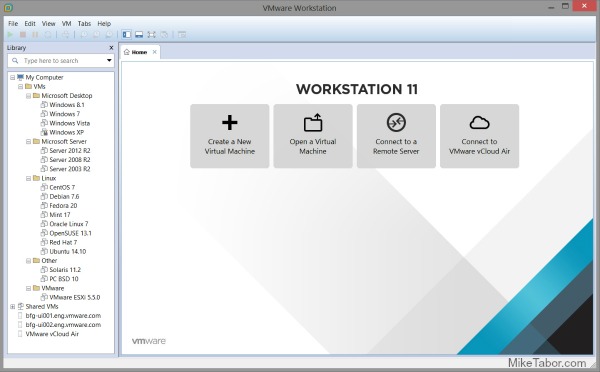
VMware Workstation 11

VMware Workstation 11 updates include:

  • Windows 10 Tech Preview Ready: VMware Workstation 11 can run hundreds of operating systems including the latest Microsoft Windows 10 Tech Preview. Technical users can also run the latest Linux distributions including Ubuntu 14.10, RHEL 7, CentOS 7, Fedora 20, Debian 7.6 and many more.
  • Improved State of the Art Performance: VMware Workstation supports the latest Intel 64-bit x86 processors, including the new Haswell microarchitecture for maximum performance. Taking advantage of key new Intel Haswell extensions, Workstation 11 also delivers up to 45 percent improvement in CPU intensive operations like multimedia and encryption/decryption compared to Workstation 10.
  • Large Virtual Machines and Better Graphics: Workstation 11 will now support virtual machines with up to 16 vCPUs, 8 TB virtual disks, 64GB memory, and now 2GB of video memory which graphics intensive applications will take advantage of the additional boost of video memory.
  • Connection to VMware vCloud Air: Connect to VMware vCloud Air to extend and scale virtual machines on a public cloud. Developers can easily connect to VMware vCloud Air and upload, run, and view virtual machines right from the Workstation interface to easily collaborate with remote team members and scale through a public cloud.

VMware Workstation 11 will be available for purchase in December for $249.99 while upgrades from Workstation 9 and 10 to Workstation 11 for $149.99. Those who buy Workstation 10 between October and December 2014 will receive the Workstation 11 upgrade for free! For more info about the free upgrade be sure to view the upgrade page.

VMware Player 7 Pro

In addition to the VMware Workstation announcement, VMware has also announced VMware Player 7 will be available in December as well. VMware Player 7 Pro is licensed for commercial use and is enabled to run restricted virtual machines created by VMware Workstation 11 and Fusion Pro 7.

VMware Player 7 Pro Features
  • Enhanced Operating System Compatibility: VMware Player 7 Pro will run on the latest release of Windows including Windows 8.1 and will support prevalent operating systems like Windows XP and Windows 7 in a virtual environment so users can continue to run legacy applications as long as they need.
  • Greater Hardware Compatibility: VMware Player 7 Pro will be optimized to run on today’s modern hardware including the latest PC laptops and high-resolution tablets.
  • Updated VMware Compatibility: VMware Player 7 Pro will be able to run restricted virtual machines created by VMware Workstation 11 or VMware Fusion 7 Pro. Restricted virtual machines secure corporate desktops with encryption, runtime password protection, USB access restriction, isolation between the host and guest OS, and time limitation.

VMware Player 7 Pro will be avilable for $149.99 and upgrades from Player 6 Pro running $79.99.

Similar Posts

  • vSphere 5.1 and View 5.1 are finally compatible

    As mentioned before, I mentioned vSphere 5.1 currently not compatible with any VMware View version. As of yesterday, VMware has finally released a patch (ESXi510-201210001) to correct the incompatibility issues.

    Alternatively you can also download an updated ESXi 5.0 ISO. To download the ISO:

    1. Navigate to the vSphere Download Center.
    2. Click View Download for the VMware ESXi 5.1.0 Installable for your version of ESXi.
    3. On the Product Downloads tab, download VMware-VMvisor-Installer-201210001-838463.x86_64.iso.

    KB 2035268

  • Thank you VMware Community!

    VMware vExpert 2014

    So far, 2014 has been a very rewarding year for a number of reasons, two of which has happened in just a week or two span. First, Eric Siebert (@ericsiebert) announced on March 27th, this years results of the 2014 Top VMware & Virtualization Blog voting. My first year entered into voting and made it to 71st place! A huge thanks goes out to not only Eric but just as much so to everyone who voted for me!

    To top it off, yesterday VMware announced 2014’s first quarter VMware vExpert list. While vExpert isn’t a technical certification or even a general measure of VMware expertise. The VMware judges selected people who were engaged with their community and who had developed a substantial personal platform of influence in those communities. There were a lot of very smart, very accomplished people, even VCDXs, that weren’t named as vExpert this year. VMware awarded this title to 754 people this year and on that list of many impressive names you’ll find yours truly, Michael Tabor!

    I’m both honored and humbled by both lists. It’s a great feeling to be recognized by not only my peers through the voting in the Top vBlog but also by VMware themselves through the vExpert title.

    So again THANK YOU very much to the entire VMware community, a spectacular community indeed, and congratulations to everyone else that made the Top vBlog and vExpert lists!

  • VMware vCenter Server 5.5.0a update released

    VMware has released an update to vCenter 5.5 Server. The new updated, numbered 5.5.0a doesn’t appear to add any new features but instead focus on squishing a number of bugs in the 5.5 version – mostly around vCenter Single-Sign-On and the vSphere web client.

    Issues resolved with this release are as follows:

    1. Attempts to upgrade vCenter Single Sign-On (SSO) 5.1 Update 1 to version 5.5 might fail with error code 1603
    2. Attempts to log in to the vCenter Server might be unsuccessful after you upgrade from vCenter Server 5.1 to 5.5
    3. Unable to change the vCenter SSO administrator password on Windows in the vSphere Web Client after you upgrade to vCenter Server 5.5 or VCSA 5.5
    4. VPXD service might fail due to MS SQL database deadlock for the issues with VPXD queries that run on VPX_EVENT and VPX_EVENT_ARG tables

    Read More “VMware vCenter Server 5.5.0a update released”

  • VMware Horizon View 5.3 has been announced

    Horizon View 5.2 is receiving an update to 5.3! Doesn’t sound like much, but in that tiny dot number increase VMware has in fact brought a number improvements and features to Horizon View.

    In a nut shell, some features Horizon View 5.3 brings is the ability to connect to a virtual desktop from any HTML5 capable web browser (yes, even Chromebook!), ability to bring full workstation class user experience with 3D graphics, deploy Windows Server 2008 as a desktop, as well as completely rewritten the Windows client with support for Windows 8.1 and a new iOS7 client too.

    In more detail, Horizon View 5.3 brings…

    Read More “VMware Horizon View 5.3 has been announced”

  • Upgrade VCSA 6.5 to VCSA 6.7 Update 1

    VMware vCenter 6.7 U1 has recently been released. Last week I posted how to upgrade VCSA 6.7 to 6.7 Update 1, this post will walk you though upgrading VMware vCenter Server Appliance 6.5 to VCSA 6.7 Update 1!

    When doing a VCSA version upgrade the upgrade process is much different, than going from say 6.7 to 6.7 U1. When going from 6.5 to 6.7 the upgrade is actually broken up into two stages.

    The first stage involves deploying a brand new vCenter 6.7 appliance. Then the second stage will copy the data from your 6.5 VCSA into the newly deployed 6.7 VCSA from stage 1.

    Read More “Upgrade VCSA 6.5 to VCSA 6.7 Update 1”

  • VMware’s Dual Persona smartphones now available at Verizon Wireless

    VMware Ready for Verizon

    VMware has announced that the Android running LG Intuition and Motorola Razr M can now both be purchased with VMWare Horizon Mobile software. The VMWare Horizon Mobile software separates the devices into isolated partitions that allow users to keep their work applications and data separate from their personal applications and data.

    Today, VMware and Verizon Wireless announced that the Android-based LG Intuition and Motorola Razr M can now be purchased with VMware’s Horizon Mobile software, which separates the device into isolated partitions that keep a user’s work applications and data separate from personal stuff. Licenses to Horizon Mobile start at $125 per user and can be purchased through local resellers of VMware and Verizon Wireless.

    Read More “VMware’s Dual Persona smartphones now available at Verizon Wireless”

Leave a Reply

Your email address will not be published. Required fields are marked *

2 Comments