RIP VMware VCAP, replaced by VCIX

Yesterday VMware announced vSphere 6 and today VMware has announced the new certification roadmap and to no surprise the new VCP6 DCV exam has been announced. One certification that’s missing is the VCAP (VMware Certified Advanced Professional), replacing the VCAP is the VCIX (VMware Certified Implementation Expert).
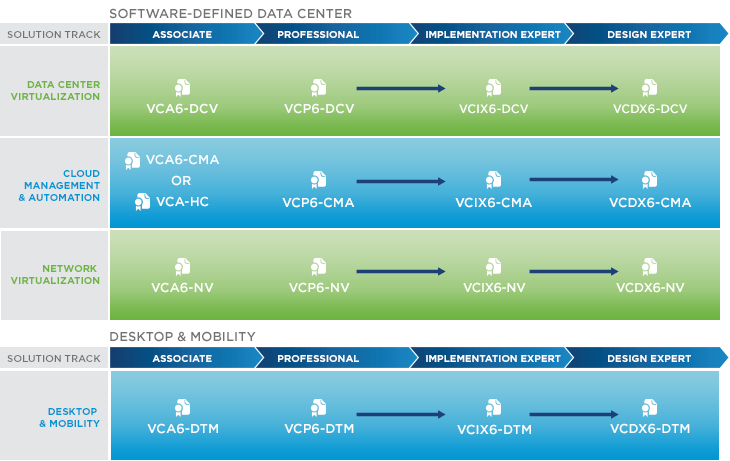
VMware Cert Roadmap 2015Q1

The VCIX is intended to provide a more thorough validation of candidates skills and knowledge by focusing on both implementation, advanced administration, and design skills and knowledge. The VCIX is broken down into two exam parts, one focused on administration and the other focused on design.

Check out the VMware Certification 2015 Roadmap page for more details.

R.I.P VCAP :(
Similar Posts

  • Power off an unresponsive VM using ESXTOP

    Just recently we have some hardware issues in our primary datacenter and during that time had a few VM’s that became unresponsive and needed to get them back online. The VM’s had stopped responding to the normal vSphere commands to reboot, shutdown or even restart. I didn’t want to power cycle the entire ESXi host and instead just power off an unresponsive VM.

    Here is a quick and easy way to do just that using ESXTOP.

    Read More “Power off an unresponsive VM using ESXTOP”

  • VMware Workstation 12.5.5 released, fixes Pwn2Own exploits

    VMware Workstation 12.5

    VMware has just released Workstation 12.5.5 which includes bug fixes as well as fixes for several vulnerabilities found in this years Pwn2Own contest, which two hacking teams, 360 Security (@mj011sec) and Team Sniper was able to successfully complete a virtual machine escape.

    While these are serious exploits, VMware has said they are not aware of any active exploitation of the vulnerabilities that has now been fixed in 12.5.5.

    Read More “VMware Workstation 12.5.5 released, fixes Pwn2Own exploits”

  • Thank you VMware Community!

    VMware vExpert 2014

    So far, 2014 has been a very rewarding year for a number of reasons, two of which has happened in just a week or two span. First, Eric Siebert (@ericsiebert) announced on March 27th, this years results of the 2014 Top VMware & Virtualization Blog voting. My first year entered into voting and made it to 71st place! A huge thanks goes out to not only Eric but just as much so to everyone who voted for me!

    To top it off, yesterday VMware announced 2014’s first quarter VMware vExpert list. While vExpert isn’t a technical certification or even a general measure of VMware expertise. The VMware judges selected people who were engaged with their community and who had developed a substantial personal platform of influence in those communities. There were a lot of very smart, very accomplished people, even VCDXs, that weren’t named as vExpert this year. VMware awarded this title to 754 people this year and on that list of many impressive names you’ll find yours truly, Michael Tabor!

    I’m both honored and humbled by both lists. It’s a great feeling to be recognized by not only my peers through the voting in the Top vBlog but also by VMware themselves through the vExpert title.

    So again THANK YOU very much to the entire VMware community, a spectacular community indeed, and congratulations to everyone else that made the Top vBlog and vExpert lists!

  • Update vCenter Server Appliance 6.7 to 6.7 Update 1

    VMware has released vCenter Server 6.7 Update 1 and with comes with a number changes.

    One most notable change is the feature complete HTML5 vSphere client. The vSphere client in vCenter 6.7 Update 1 now includes the ability to manage:

    • Host profiles
    • Auto deploy
    • Full vSphere Update Manager (VUM)
    • A new dark theme
    • and vCenter High Availability.

    That’s no where near all of the changes though, there are many more changes and updates in the 6.7 Update 1 update. Be sure to read the full release notes here.

    In this post we’ll see just how easy it is to upgrade from VCSA 6.7 to VCSA 6.7 Update 1 in just a couple steps!

    Read More “Update vCenter Server Appliance 6.7 to 6.7 Update 1”

  • VMware Workstation 12 Pro Released

    VMware has just released a new version of Workstation in VMware Workstation 12 Pro. Workstation 12 Pro provides full support for Windows 10, including features such as Cortana and universal applications. As well as even larger virtual machines with up to 16 vCPU’s and 64GB of memory. Workstation 12 Pro even supports 4K displays and DirectX 10 and OpenGL 3.3

    You can even seamlessly drag and drop virtual machines between your PC and your internal cloud running vSphere, ESXi or another instance of Workstation. In addition, easily connect to vCloud Air and upload, run, and view virtual machines right from the Workstation 12 Pro interface.

    Read More “VMware Workstation 12 Pro Released”

  • Another CBT bug found in VMware ESXi 6.0

    VMware

    VMware just published KB 2136854 regarding a new bug found in ESXi 6.0 that causes virtual machine backups, which use Changed Block Tracking (CBT), to be inconsistent. VMware says the cause of the issue is this:

    This issue occurs due to an issue with CBT in the disklib area, this causes the change tracking information of I/Os that occur during snapshot consolidation to be lost. The main backup payload data is never lost and it is always written to the backend device. However, the corresponding change tracking information entries which occur during the consolidation task are missed. Subsequent QueryDiskChangedAreas() calls do not include these missed blocks, hence a backup based on this CBT data is inconsistent.

    Read More “Another CBT bug found in VMware ESXi 6.0”

Leave a Reply

Your email address will not be published. Required fields are marked *