Power off an unresponsive VM using ESXTOP

Just recently we have some hardware issues in our primary datacenter and during that time had a few VM’s that became unresponsive and needed to get them back online. The VM’s had stopped responding to the normal vSphere commands to reboot, shutdown or even restart. I didn’t want to power cycle the entire ESXi host and instead just power off an unresponsive VM.

Here is a quick and easy way to do just that using ESXTOP.

How to kill an unresponsive VM using ESXTOP

  1. SSH into the host that the virtual machine is currently running on using PuTTy or your choice of client.
  2. Type: esxtop to start ESXTOP.
  3. Press c to enter the CPU view of ESXTOP.
    Note: It may be helpful to press shift and V so that only VM’s are shown.
  4. Press f to change what display fields are shown and press c to show the LWID field, then press ENTER to go back to the CPU view.
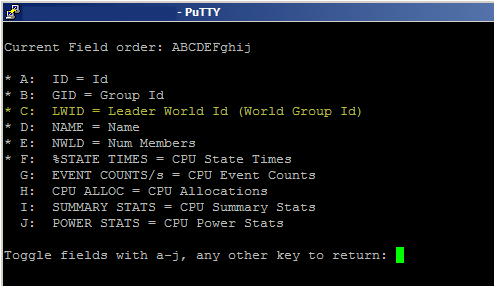
    SSH add LWID field
  5. Finally, press k to open the “kill” prompt and enter the LWID of the VM you would like to power off and press ENTER.
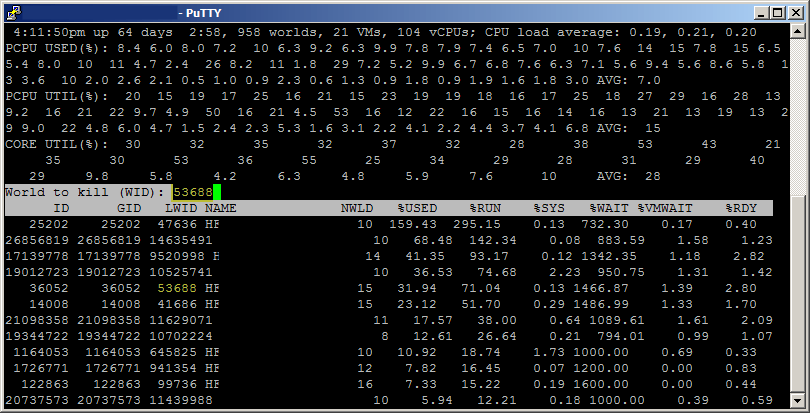
    Using ESXTOP to kill VM using LWID

At this point the VM should be powered off. Keep in mind this will perform a hard power off, similar to yanking the power from a physical box so you really only want to do this if the VM is not responding to any other commands in order to gracefully power it off.

How to kill a VM using vSphere CLI

You can get the same result as above, powering off a VM, and not needing to use ESXTOP at all.

  1. SSH into the host where the unresponsive VM is located and type the following:
    vim-cmd vmsvc/getallvms
  2. Take note of world ID of the VM and then use the following command to issue a shutdown by typing, making sure to replace (vmid) with the world ID:
    vim-cmd vmsvc/power.off (vmid)
  3. If you find the VM still won’t power off you can kill the PID for the VM. Use lsof to find the pid that has the vmx (config file) open and then use kill to terminate it.
    lsof /vmfs/volumes/datastore/vmname/vmname.vmx
    kill -9 (pid)

Thanks goes to /u/Acaila on Reddit for pointing out this other method!
Similar Posts

  • VMUG EVALExperience, the new VMware VMTN

    VMUG EVALExperience

    Long ago VMware offered a program called VMware Technology Network (VMTN) which was very similar to Microsoft’s TechNet, which allowed you to download and run various VMware software within your home lab for a small yearly fee. Just like the Microsoft TechNet, the VMware VMTN program was eventually closed. From the time the VMTN program closed many people have begged and pleaded with VMware to bring the program back, there is even a long forum thread asking VMware to bring VMTN back. Though it never did… until now.

    Read More “VMUG EVALExperience, the new VMware VMTN”

  • Backup and Restore VMware VCSA 6.5

    With the release of vSphere 6.5, the VCSA has had a built-in and convenient way easily backup the configuration, inventory and even historical data right from the VAMI and directly into a TAR bundle. VMware has also made restoring the VCSA from a backup just as easy as well.

    Below are quick and dirty steps to backing up and restoring your VMware VCSA!

    Read More “Backup and Restore VMware VCSA 6.5”

  • VMware Update Manager U3e upgrade failing? Un-install it!

    VMware Update Manager U3e error

    I was recently upgrading a VMware environment from vCenter Server Update 3b to Update 3e and during the scheduled change I had also planned on upgrading VMware Update Manager to Update 3e and ran into the following error:

    VMware Workstation unrecoverable error: (vthread-3)
    GetProcAddress: Failed to resolve ENGINE)load_aesni: 127
    You can request support.

    Looking for a possible solution at the VMware Knowledge Base came back with no results and to error message wasn’t overly useful either with “VMware Workstation unrecoverable error: (vthread-3)” as Workstation wasn’t installed on this server.

    Read More “VMware Update Manager U3e upgrade failing? Un-install it!”

  • VMware vCenter Server 5.5.0a update released

    VMware has released an update to vCenter 5.5 Server. The new updated, numbered 5.5.0a doesn’t appear to add any new features but instead focus on squishing a number of bugs in the 5.5 version – mostly around vCenter Single-Sign-On and the vSphere web client.

    Issues resolved with this release are as follows:

    1. Attempts to upgrade vCenter Single Sign-On (SSO) 5.1 Update 1 to version 5.5 might fail with error code 1603
    2. Attempts to log in to the vCenter Server might be unsuccessful after you upgrade from vCenter Server 5.1 to 5.5
    3. Unable to change the vCenter SSO administrator password on Windows in the vSphere Web Client after you upgrade to vCenter Server 5.5 or VCSA 5.5
    4. VPXD service might fail due to MS SQL database deadlock for the issues with VPXD queries that run on VPX_EVENT and VPX_EVENT_ARG tables

    Read More “VMware vCenter Server 5.5.0a update released”

  • VMware Recertification Policy

    VMware certified

    Starting today, March 10 2014, new VCP certifications must be re-certified within two years of it’s earned date. Anyone who currently has their VCP certification prior to March 10 2013 has until March 10, 2015 to re-certify.

    The new policy gives you three options to re-certify:

    1. Take the current exam for your existing VCP certification solution track. For example, if you are a VCP3, you could take the current VCP5-Data Center Virtualization (VCP5-DCV) exam.
    2. Earn a new VCP certification in a different solution track. For example, if you are a VCP-Cloud, you could recertify by earning VCP5-Desktop (VCP5-DT) certification.
    3. Advance to the next level by earning a VMware Certified Advanced Professional (VCAP) certification. For example, if you are a VCP5-DCV you could earn VCAP5-DCA certification.

    I can understand why they are doing this but I don’t agree with the changes. As per the announcement if you let your certification expire, “Your certification will be revoked,and you will no longer be entitled to use the certification logo or represent yourself as VMware certified“. Really? You mean everything that was done prior and after taking the exam means nothing?

    Read More “VMware Recertification Policy”

Leave a Reply

Your email address will not be published. Required fields are marked *

One Comment

  1. This is a nice post, I thought I would add that Ghost PIDs & WIDs exist. If you run either of the commands listed in this post and the result is “PID or WID not found.” Double check the PID/WID and if it is correct, a reboot of the ESXi host is the only fix.

    We only encounter this in our Horizon View Cluster and it happens for customers on ESXi 5.x and ESXi 6.x running View 5.x or 6.x.