HTML5 Embedded Host Client, this looks promising

It’s no secret many people have really disliked the vSphere web client, it’s very sluggish, clunky, and based on flash (flash comes with it’s own security issues). It was rumored and highly hoped that vSphere 6 might be re-written in HTML5, but sadly this didn’t and hasn’t happened yet. While vSphere 6 did improve a bit on the web client the issues many people have had with it in the past still remain today.

Enter the VMware HTML5 Embedded Host Client fling. I’ve been using and following this fling for a while now and have really enjoyed it and with each release it keeps getting better and better.

The Embedded Host Client fling is based on HTML5 which allows it works great across all kinds of platforms, it’s fast, responsive, and doesn’t require any plug-ins – YES the VM console works great. If this happens to be a look of what’s to come in a new VMware vSphere web client, then a client is looking very promising!

If you haven’t tried it yet, you should. It’s extremely easy to install and doesn’t even require a reboot just follow these simple instructions.

Installing ESXi Embedded Host Client Fling

  • SSH into your host using PuTTy or other terminal client.
  • Allow HTTP requests by opening the ESXi firewall by typing:
    esxcli network firewall ruleset set -e true -r httpClient
  • Enter the following command to install the Embedded Host Fling:
    esxcli software vib install -v http://download3.vmware.com/software/vmw-tools/esxui/esxui_signed.vib

    esxi embedded host client install

  • Now close the ESXi firewall back up by typing:
    esxcli network firewall ruleset set -e false -r httpClient
  • Open your browser and go to:
    https://ESXi_FQDN_or_IP/ui

VMware ESXi host client fling

The current VMware web client is the only reason I still have Flash installed on my work computer and given the horribly track record of Flash when it comes to security, it would be great to see something like this fling replace the vSphere web client and remove the need for Flash entirely.

How to remove the HTML5 Embedded Host Client

  • SSH into the host and type the following command:
    esxcli software vib remove -n esx-ui
What’s new in version 5 of ESXi Embedded Host Client

Host

  • Improvements to performance monitoring UI, resize dragger, tooltip behavior

VM

  • Export VM support (basic)
  • Experimental IT/ES keyboard support for in-browser console
  • Fixed some major issues with storage controller manipulation
    (adding/removing controllers, assigning disks, etc.)

Storage

  • Fixed sorting in datastore browser

General

  • Improved table behavior, including comprehensive filtering, column selection
  • Improved Recent Tasks table performance
  • Improved VM table performance
  • Improved context menu behavior on iPad
  • Ability to drag/resize all windows/dialogs on iPad
  • Many many bug fixes

Similar Posts

  • VMware Workstation 12.5.5 released, fixes Pwn2Own exploits

    VMware Workstation 12.5

    VMware has just released Workstation 12.5.5 which includes bug fixes as well as fixes for several vulnerabilities found in this years Pwn2Own contest, which two hacking teams, 360 Security (@mj011sec) and Team Sniper was able to successfully complete a virtual machine escape.

    While these are serious exploits, VMware has said they are not aware of any active exploitation of the vulnerabilities that has now been fixed in 12.5.5.

    Read More “VMware Workstation 12.5.5 released, fixes Pwn2Own exploits”

  • vSphere 5.1 and View 5.1 are finally compatible

    As mentioned before, I mentioned vSphere 5.1 currently not compatible with any VMware View version. As of yesterday, VMware has finally released a patch (ESXi510-201210001) to correct the incompatibility issues.

    Alternatively you can also download an updated ESXi 5.0 ISO. To download the ISO:

    1. Navigate to the vSphere Download Center.
    2. Click View Download for the VMware ESXi 5.1.0 Installable for your version of ESXi.
    3. On the Product Downloads tab, download VMware-VMvisor-Installer-201210001-838463.x86_64.iso.

    KB 2035268

  • Thank you VMware Community!

    VMware vExpert 2014

    So far, 2014 has been a very rewarding year for a number of reasons, two of which has happened in just a week or two span. First, Eric Siebert (@ericsiebert) announced on March 27th, this years results of the 2014 Top VMware & Virtualization Blog voting. My first year entered into voting and made it to 71st place! A huge thanks goes out to not only Eric but just as much so to everyone who voted for me!

    To top it off, yesterday VMware announced 2014’s first quarter VMware vExpert list. While vExpert isn’t a technical certification or even a general measure of VMware expertise. The VMware judges selected people who were engaged with their community and who had developed a substantial personal platform of influence in those communities. There were a lot of very smart, very accomplished people, even VCDXs, that weren’t named as vExpert this year. VMware awarded this title to 754 people this year and on that list of many impressive names you’ll find yours truly, Michael Tabor!

    I’m both honored and humbled by both lists. It’s a great feeling to be recognized by not only my peers through the voting in the Top vBlog but also by VMware themselves through the vExpert title.

    So again THANK YOU very much to the entire VMware community, a spectacular community indeed, and congratulations to everyone else that made the Top vBlog and vExpert lists!

  • VMware Recertification Policy

    VMware certified

    Starting today, March 10 2014, new VCP certifications must be re-certified within two years of it’s earned date. Anyone who currently has their VCP certification prior to March 10 2013 has until March 10, 2015 to re-certify.

    The new policy gives you three options to re-certify:

    1. Take the current exam for your existing VCP certification solution track. For example, if you are a VCP3, you could take the current VCP5-Data Center Virtualization (VCP5-DCV) exam.
    2. Earn a new VCP certification in a different solution track. For example, if you are a VCP-Cloud, you could recertify by earning VCP5-Desktop (VCP5-DT) certification.
    3. Advance to the next level by earning a VMware Certified Advanced Professional (VCAP) certification. For example, if you are a VCP5-DCV you could earn VCAP5-DCA certification.

    I can understand why they are doing this but I don’t agree with the changes. As per the announcement if you let your certification expire, “Your certification will be revoked,and you will no longer be entitled to use the certification logo or represent yourself as VMware certified“. Really? You mean everything that was done prior and after taking the exam means nothing?

    Read More “VMware Recertification Policy”

  • VMware Workstation 11 released

    VMware Workstation 11 Unmatched OS Support

    At the start of October VMware announced Workstation 11, along with VMware Player 7 Pro and said both products would be available sometime in December. Well today is the day, VMware has now officially released VMware Workstation 11!

    Workstation 11 adds support for the latest version of Windows and Linux, as well as the latest processors and hardware, and also adds the ability to connect to VMware vCloud Air.

    Read More “VMware Workstation 11 released”

  • VMware Update Manager U3e upgrade failing? Un-install it!

    VMware Update Manager U3e error

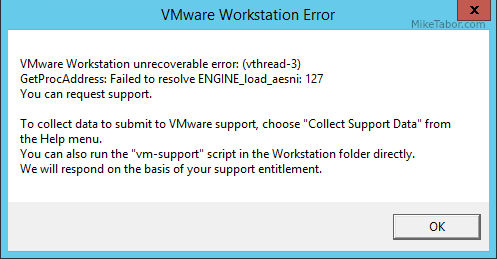
    I was recently upgrading a VMware environment from vCenter Server Update 3b to Update 3e and during the scheduled change I had also planned on upgrading VMware Update Manager to Update 3e and ran into the following error:

    VMware Workstation unrecoverable error: (vthread-3)
    GetProcAddress: Failed to resolve ENGINE)load_aesni: 127
    You can request support.

    Looking for a possible solution at the VMware Knowledge Base came back with no results and to error message wasn’t overly useful either with “VMware Workstation unrecoverable error: (vthread-3)” as Workstation wasn’t installed on this server.

    Read More “VMware Update Manager U3e upgrade failing? Un-install it!”

Leave a Reply

Your email address will not be published. Required fields are marked *