Edit Virtual Hardware 10 VM’s with vSphere 5.5 U2 client

When ESXi 5.5 came out so did a new virtual hardware version, 10, as well. However the ability to edit virtual machines have have been upgraded to virtual hardware 10 was restricted to only the vSphere web client. In some cases people have put off upgrading to virtual hardware 10 either for dislike of the web client or knowing you cannot edit the VM in the event of the web client being down.

That all changes today, VMware has just released vCenter 5.5 Update 2 today and one of the “resolved issues” in today’s release notes is the ability to now edit virtual machines with Virtual Hardware 10 using the vSphere thick (C#) client.
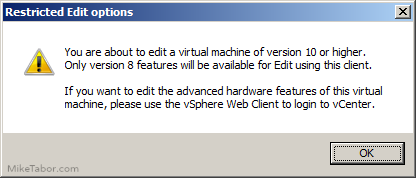
edit virtual hardware 10

All you need to do is install the latest vSphere 5.5 Update 2 thick client to enable this function. This feature is NOT dependent on your environment (vCenter or hosts) running 5.5 Update – just install the vSphere 5.5 U2 client!

Once you have the new vSphere client installed, simply click on “Edit settings” on any VM using virtual hardware 10 and you’ll first be prompted with the above message and then displayed the Edit virtual machine settings window. Then you can again edit vCPU, memory, NIC, etc settings.

Similar Posts

  • Shrink a thin provisioned VMDK disk

    When maintaining a Horizon View environment I like to keep my parent images as small as possible and over time a thin provision disk can start to grow on you if you don’t watch it – be it from downloading installers, updates, or even running disk defrag. While there isn’t a simple, one click button in the View Administrator Console there is a fairly easy manual method using vmfkstools.

    Before we can use “vmkfstools” to shrink the VMDK file we must zero out any unused space on the thin provisioned disk. A simple way of doing this is by using a free utility called SDelete from Sysinternals.

    Read More “Shrink a thin provisioned VMDK disk”

  • How to install VMware vCenter Log Insight

    VMware vCenter Log Insight

    Log Insight is a real-time log management and analytics solution, and one of VMware’s newest product. Log Insight was recently updated to version 2.0 and available to download here.

    Below we’ll go through the steps to installing VMware Log Insight and you’ll soon see just how easy it is to get Log Insight up and running.

    Read More “How to install VMware vCenter Log Insight”

  • Fixing, This host currently has no management network redundancy

    host no management network redundancy

    I recently redid my VMware home lab environment and after enabling HA the warning message “This host currently has no management network redundancy” started displaying on each of my ESXi hosts.

    This warning happens because in a HA cluster there is a requirement for the management network to have redundant NICs, but in my case I’m using Intel NUCs which only have a single NIC and since this is only a lab I don’t care to see the warning so lets disable it.

    Read More “Fixing, This host currently has no management network redundancy”

  • VMware Certified Professional 6 (VCP6-DCV) now available

    VMware VCP DCV

    VMware has just recently announced that the VMware Certified Professional 6 (VCP6-DCV) is now available. The new VCP6 exam is similar to the others in the past whereas the VCP6 aims to validate your ability to deploy, configure, administer and scale a vSphere virtualized data center, including administering and troubleshooting virtualization technologies such as:

    • vSphere HA and DRS Clusters
    • Storage virtualization using VMFS
    • Storage DRS and Storage I/O Control
    • Network virtualization using vSphere standard and distributed switches and Network I/O Control
    • vSphere management using vCenter Server and vRealize Operations Manager Standard
    • Virtual Machines

    Read More “VMware Certified Professional 6 (VCP6-DCV) now available”

  • VMware vCenter Server 5.5b released

    vmware vcenter 5.5b released

    VMware hasn’t let the holidays get in their way and has released vCenter Server 5.5b (Build 1476387) along with vCenter Server Appliance 5.5.0b (Build 1476389). The update includes a number of fixes.

    Resolved Issues in 5.5.0b

    Upgrade and Installation

    • Upgrading the vSphere Web Client to vSphere 5.5 fails with an error
      Attempts to upgrade the vSphere Web Client to vSphere 5.5 fails when they are installed in a custom, non-default location. An error message similar to the following is displayed:

      Error 29107. The service or solution user already registered...

    Read More “VMware vCenter Server 5.5b released”

  • Thank you VMware Community!

    VMware vExpert 2014

    So far, 2014 has been a very rewarding year for a number of reasons, two of which has happened in just a week or two span. First, Eric Siebert (@ericsiebert) announced on March 27th, this years results of the 2014 Top VMware & Virtualization Blog voting. My first year entered into voting and made it to 71st place! A huge thanks goes out to not only Eric but just as much so to everyone who voted for me!

    To top it off, yesterday VMware announced 2014’s first quarter VMware vExpert list. While vExpert isn’t a technical certification or even a general measure of VMware expertise. The VMware judges selected people who were engaged with their community and who had developed a substantial personal platform of influence in those communities. There were a lot of very smart, very accomplished people, even VCDXs, that weren’t named as vExpert this year. VMware awarded this title to 754 people this year and on that list of many impressive names you’ll find yours truly, Michael Tabor!

    I’m both honored and humbled by both lists. It’s a great feeling to be recognized by not only my peers through the voting in the Top vBlog but also by VMware themselves through the vExpert title.

    So again THANK YOU very much to the entire VMware community, a spectacular community indeed, and congratulations to everyone else that made the Top vBlog and vExpert lists!

Leave a Reply

Your email address will not be published. Required fields are marked *