VMware VCP5-DCV Delta Re-certification Exam
VMware VCP DCV

Looking to renew your VCP before the March 10th 2015 expiration date? Then the new VMware VCP5-DCV Delta (Exam Code VCP550D) is a cheaper way to renew your VCP without taking the full on exam or not just ready to tackle the VCAP. The new exam covers new material between the vSphere 5.0/5.1 and vSphere 5.5 exams – looking the the blueprints, most noticeably VSAN.

While you still have to schedule the exam through Pearson VUE, you don’t have to take the course at a testing center and instead can take it online from any device!

If you’re interested in taking the recertification exam you have until November 30th, 2014 March 15, 2015 to pass the exam. And in case you’re wondering, the 25% VCP coupon code I posted earlier does NOT apply to this new exam. However the VMware VCP5-DCV Delta does cost less at $120.00.

To request authorization for the VMware VCP5-DCV Delta (VCP550D) exam click here.

UPDATE: The VCP550 Delta exam has been brought back and is now available to take until March 10, 2015!

UPDATE #2: The VCP550 Delta exam has again been extended, now available until May 8th, 2015!

UPDATE #3: The VCP550 Delta exam has again been extended, now available until March 31st, 2016! (link)
Similar Posts

  • VMware Recertification Policy

    VMware certified

    Starting today, March 10 2014, new VCP certifications must be re-certified within two years of it’s earned date. Anyone who currently has their VCP certification prior to March 10 2013 has until March 10, 2015 to re-certify.

    The new policy gives you three options to re-certify:

    1. Take the current exam for your existing VCP certification solution track. For example, if you are a VCP3, you could take the current VCP5-Data Center Virtualization (VCP5-DCV) exam.
    2. Earn a new VCP certification in a different solution track. For example, if you are a VCP-Cloud, you could recertify by earning VCP5-Desktop (VCP5-DT) certification.
    3. Advance to the next level by earning a VMware Certified Advanced Professional (VCAP) certification. For example, if you are a VCP5-DCV you could earn VCAP5-DCA certification.

    I can understand why they are doing this but I don’t agree with the changes. As per the announcement if you let your certification expire, “Your certification will be revoked,and you will no longer be entitled to use the certification logo or represent yourself as VMware certified“. Really? You mean everything that was done prior and after taking the exam means nothing?

    Read More “VMware Recertification Policy”

  • Installing VMware vCenter Server Appliance 6.5

    VMware has announced that VMware vSphere 6.5 has gone general available this week. Now installing VMware vCenter Server Appliance 6.5 (VCSA) is even easier as the requirement for the client integration plugin has been removed and now the VCSA appliance is delivered via an ISO image with an installation wizard that’s been broken up into two stages.

    The VCSA 6.5 ISO offers two types of installation methods, CLI and GUI install – both availalbe for Windows, Mac and Linux machines. In this guide I’ll walk through the steps of installing VCSA 6.5 using the Windows GUI install.

    Read More “Installing VMware vCenter Server Appliance 6.5”

  • How-to fix VMware Converter error FAILED: Unable to find the system volume, reconfiguration is not possible.

    I was recently tasked with migrating a Hyper-V machine to our VMware environment. However, each time VMware Converter was ran, the task would fail at 97% with an error “FAILED: Unable to find the system volume, reconfiguration is not possible.“.

    FAILED: Unable to find the system volume, reconfiguration is not possible

    Looking further into the virtual machine there were a number of concerns I had on the VM. One such issue which I believe might be causing the above error, is that the system volume drive was on drive 0 while the “C:” drive was on drive 1. Whereas these are typically on the same drive in most Windows installs.

    Below are the steps I took to fix this VM and made the migration from Hyper-V to VMware a success.

    Read More “How-to fix VMware Converter error FAILED: Unable to find the system volume, reconfiguration is not possible.”

  • VMware ESXi 6.0 CBT bug fix released

    VMware

    You may remember ESXi 4.x-5.x had a CBT bug, as mentioned here, that could potentially cause your backups to be pretty useless. Well it seems ESXi 6.0 isn’t without it’s own CBT bug which could cause the following to possibly occur:

    • Backing up a VM with CBT enabled fails.
    • Powering on virtual machines fails.
    • Expanding the size of a virtual disk fails.
    • Taking VM quiesced snapshots fails.

    Prior to the fix, the workaround was to disable CBT. Thankfully VMware has released a fix for the ESXi 6.0 CBT bug and it’s recommended that anyone who uses CBT apply this patch regardless if it was a clean install of VMware ESXi 6.0 or an upgrade to ESXi 6.0.

    Read More “VMware ESXi 6.0 CBT bug fix released”

  • Power off an unresponsive VM using ESXTOP

    Just recently we have some hardware issues in our primary datacenter and during that time had a few VM’s that became unresponsive and needed to get them back online. The VM’s had stopped responding to the normal vSphere commands to reboot, shutdown or even restart. I didn’t want to power cycle the entire ESXi host and instead just power off an unresponsive VM.

    Here is a quick and easy way to do just that using ESXTOP.

    Read More “Power off an unresponsive VM using ESXTOP”

  • How to convert VMDK to OVF file format

    Here is a quick and easy way to convert a VMDK to OVF file format using the OVF Tool from VMware.

    1. First download and install the VMware OVF Tool for your operating system.
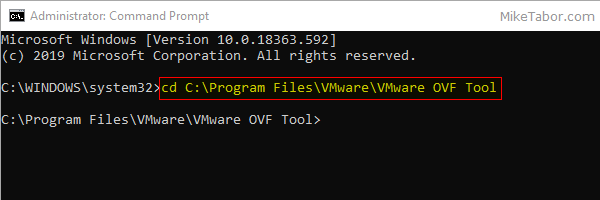
    2. Open a command prompt as Administrator and navigate to the OVF Tool install directory:
      
      cd C:\Program Files\VMware\VMware OVF Tool
      

      vmdk to ovf command prompt

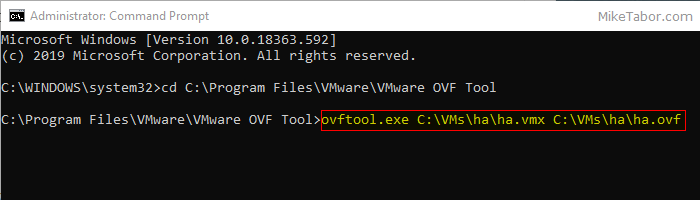
    3. Next, type in the following command to convert VMDK to OVF:
      
      ovftool.exe \virtualmachine.vmx \virtualmachine.ovf
      

      convert vmdk to ovf command

    After a few minutes time you should you should see a “Transfer Completed, Completed successfully” message and your VMDK to OVF file conversion is complete and ready for use.
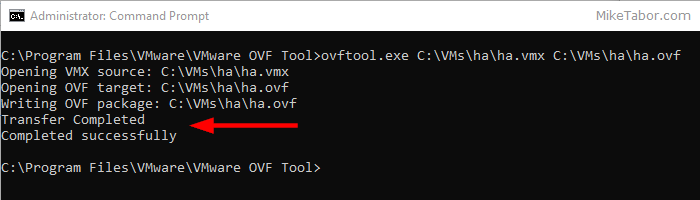
    convert vmdk to ovf complete

Leave a Reply

Your email address will not be published. Required fields are marked *

6 Comments

  1. The Blueprint states all the same details as if you were taking the exam fresh.. are there are good resources to revise to just show the differences since that what the exam seems to be asking for (ie. different maximums, specs, features)

    1. Bob,

      Just skimming over the 5.1 DCV and the 5.5 DCV Delta blueprints these are the topics that I’m seeing added in the Delta blueprint that is NOT in the 5.1 DCV blueprint:

      Identify vCenter Server and vCenter Server database requirements Deploy the vCenter Appliance
      Upgrade a vSphere Distributed Switch
      Upgrade from VMFS3 to VMFS5
      Upgrade VMware Tools
      Upgrade Virtual Machine hardware
      Upgrade an ESXi Host using vCenter Update Manager
      Secure vCenter Server and ESXi (Objective 1.5)
      Configure and Administer Software Defined Storage (VSAN – Objective 3.3) Enable/Configure/Disable Host Power Management/Distributed Power Management Create/Delete vFlash Resource Pool
      Assign vFlash resources to VMDKs
      Install and Configure VMware Data Protection
      Create a backup job with VMware Date Protection
      Install, Configure and Administer vCenter Operations Manager (Objective 7.3)

      Could be a good starting point to start studying by.

      -Michael

      1. According to the requirements of have to have VCP510 in order to be able to write the delta exam. Does this really mean that a VCP500 can’t take the delta exam?

      2. I can’t say I recall a “VCP500” exam. Do you have any information on this exam?

        That said, so long as you took the VCP-510 (based on vSphere 5.0/5.1) or VCP-550 (based on vSphere 5.5) exam and passed, you should be eligible to take the VCP-550D delta exam.