VMware vSphere 7 announced

VMware vSphere 7

Some pretty big news coming out of VMware today. The announcement of VMware vSphere 7 to become available May 1, 2020! One of the biggest item coming out of this news so far is that vSphere 7 will come in two options.

The first being vSphere 7 as we all have known it to be for years and then the second being vSphere 7 with Kubernetes which will be available through VMware Cloud Foundation and is a new generation of vSphere for containerized applications.

Other notables is that the flash based vSphere client is FINALLY no more! From here on out, only the HTML 5 will exist. vCenter Server on Windows will also finally be put to rest and new deployments of vCenter server will be done using the tried and tested vCenter Server Appliance (VCSA) based on PhotonOS linux.

What’s new in VMware vSphere 7

  • vSphere Lifecycle Manager
  • Next-Gen Infrastructure Image Management – Manage infrastructure images to patch, update or upgrade ESXi clusters using the desired state model
  • vCenter Server Profiles – Desired state configuration management capabilities for vCenter Server. It helps the user to define/validate/apply configuration for multiple vCenterServers
  • vCenter Server Update Planner – Manage the compatibility & interoperability for vCenter Server for upgrade scenarios. We will allow users to generate the interoperability & pre-checks report, which will help them plan for upgrades
  • Content Library – Added administrative control and versioning support. Provides simple and effective centralized management for virtual machine templates, virtual appliances, ISO images, and scripts.
  • Identity federation with ADFS – Secure access and account management
  • vSphere Trust Authority – Remote attestation for sensitive workloads
  • Dynamic DirectPath IO – Support for vGPU and DirectPath I/O initial VM placement
  • DRS – Redesigned with a more workload centric approach, DRS balances resources allocated to workloads in a vSphere cluster.
  • vMotion – The recent enhancements in vMotion logic provides non-disruptive operations, irrespective of the size of VMs, specifically for large and mission-critical workloads

VMware vSphere 7 with Kubernetes

  • VMware Cloud Foundation Services – consists of two families of services -Tanzu Runtime Services and Hybrid Infrastructure Services. Powered by innovations in vSphere 7 with Kubernetes, these services enable a self-service experience through Kubernetes APIs.
  • Tanzu Runtime Services – allow developers to build applications with freedom using the upstream conformant Kubernetes distributions.
  • Hybrid Infrastructure Services – allow developers to provision and work with infrastructure such as compute, storage, and networking.
  • Tanzu Kubernetes Grid Service – The Tanzu Kubernetes Grid Service allows developers to manage consistent, compliant and conformant Kubernetes clusters
  • vSphere Pod Service – The vSphere Pod Service allows developers to run containers directly on the hypervisor for improved security, performance, and manageability.
  • Storage Service – The Volume Service allows developers to manage persistent disks for use with containers, Kubernetes and virtual machines.
  • Network Service – The Network Service allows developers to manage Virtual Routers, Load Balancers and Firewall Rules.
  • Registry Service – The Registry Service allows developers to store, manage and secure Docker and OCI images.

Overview of VMware vSphere 7

What’s New in vCenter Server 7?

Lots of exciting stuff coming out about the new version 7 and I’m looking forward to learning more as more information is released.
Similar Posts

  • How to fix vRealize Orchestrator 6 appliance, weak ephemeral Diffie-Hellman key

    vrealize orchestrator chrome error

    I’ve recently deployed the vRealize Orchestrator appliance (6.0.2) and noticed right away that my default browser Firefox, would not load the Orchestrator appliance web panel. Firefox always complained about a weak Diffie-Hellman key.

    An error occurred during a connection to ip-address:8281. SSL received a weak ephemeral Diffie-Hellman key in Server Key Exchange handshake message. (Error code: ssl_error_weak_server_ephemeral_dh_key)

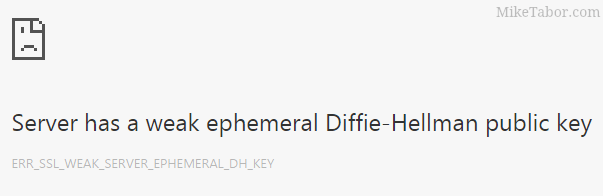
    At the time I simply ignored it and just tried Google Chrome which it worked fine. That was until the latest release also broke with the same type of error message:

    Server has a weak ephemeral Diffie-Hellman public key“.

    I now had a problem and contacted VMware support, below is the very easy fix to make vCO 6 work in both the latest version of Firefox and Chrome!

    Read More “How to fix vRealize Orchestrator 6 appliance, weak ephemeral Diffie-Hellman key”

  • Thank you VMware Community!

    VMware vExpert 2014

    So far, 2014 has been a very rewarding year for a number of reasons, two of which has happened in just a week or two span. First, Eric Siebert (@ericsiebert) announced on March 27th, this years results of the 2014 Top VMware & Virtualization Blog voting. My first year entered into voting and made it to 71st place! A huge thanks goes out to not only Eric but just as much so to everyone who voted for me!

    To top it off, yesterday VMware announced 2014’s first quarter VMware vExpert list. While vExpert isn’t a technical certification or even a general measure of VMware expertise. The VMware judges selected people who were engaged with their community and who had developed a substantial personal platform of influence in those communities. There were a lot of very smart, very accomplished people, even VCDXs, that weren’t named as vExpert this year. VMware awarded this title to 754 people this year and on that list of many impressive names you’ll find yours truly, Michael Tabor!

    I’m both honored and humbled by both lists. It’s a great feeling to be recognized by not only my peers through the voting in the Top vBlog but also by VMware themselves through the vExpert title.

    So again THANK YOU very much to the entire VMware community, a spectacular community indeed, and congratulations to everyone else that made the Top vBlog and vExpert lists!

  • Increase incremental backup speed by enabling CBT

    In a recent VMware environment I was working in, we noticed that our incremental backups was taking a long time (like up to 7-8 hours) to complete. After digging around it was found that VMware actually has a feature built-in since version 4 called Change Block Tracking (CBT). CBT will track any blocks that were changed since the last backup and tag them and stores the information in a -CTK file. The obvious benefit is that now the third party software only backs up the changed block and not the entire VM each time, reducing the amount of data being backed thus speeding up backups and even lowers the CPU utilization on the VM host.

    CBT is disabled by default though there are some backup tools that will enable it automatically or you can enable it manually which can easily be done following these steps:

    Read More “Increase incremental backup speed by enabling CBT”

  • VMware View client now availabe for Android!

    VMware has announced that they have released a View Client for Android tablets available on the Android Market now. Here are just a few of the features found on the new client.

    • A new look and feel – The View Client for Android features the NEW blue look and feel of the VMware View clients!
    • Multiple broker support – If you have more than one VMware View broker in your organization, you can can easily access your desktop from all of them via the Android client
    • Desktop Shortcuts – Quickly connect with as many as four recent desktop via shortcuts
    • Virtual trackpad – Control your desktop on a granular level just like you would control the mouse on a laptop
    • Custom keyboard toolbar – Super easy access to all of the special keys not found on the Android default keynboard
    • Honeycomb 3.x support – Made from the ground up for the new generation of Android tablets
    • Custom gestures – Invoke keyboard, scrolling, etc are as easy as ever and simple to use
    • VMware View Security Server support (best experience) – No need to have VPN when you use VMware View Security Server
    • Background tasking – Switch between apps on your tablet and come right back
  • How to create a bootable VMware ESXi installer USB flash drive

    I’ve mentioned how to create a bootable VMware ESXi installer USB flash drive in an older post, but wanted to detail the steps I use to create an ESXi bootable install drive.

    Creating a bootable flash drive is very useful for machines without a CD-Rom or remote access like an iDRAC where you can virtually mount an ISO image – such as the Intel NUC.

    The process is very easy with just one tool needed, Rufus – if you don’t already have it go ahead and download it now!

    Read More “How to create a bootable VMware ESXi installer USB flash drive”

Leave a Reply

Your email address will not be published. Required fields are marked *