Fixing, This host currently has no management network redundancy
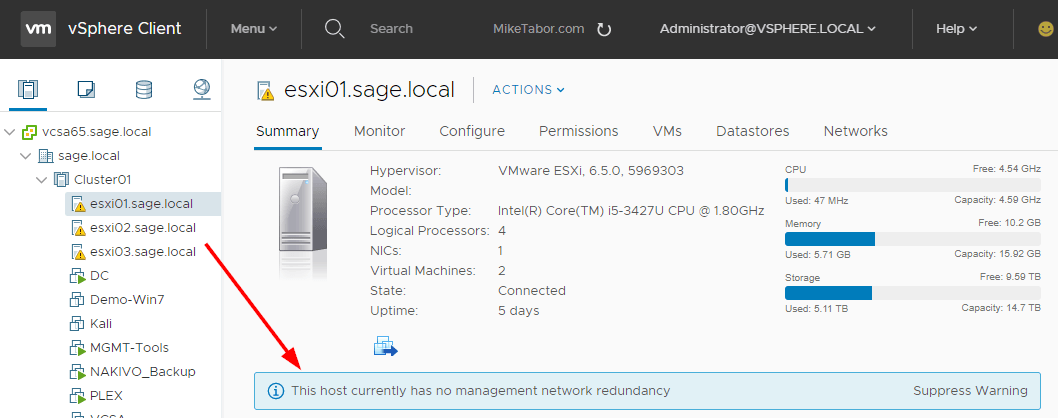
host no management network redundancy

I recently redid my VMware home lab environment and after enabling HA the warning message “This host currently has no management network redundancy” started displaying on each of my ESXi hosts.

This warning happens because in a HA cluster there is a requirement for the management network to have redundant NICs, but in my case I’m using Intel NUCs which only have a single NIC and since this is only a lab I don’t care to see the warning so lets disable it.

Disable host currently has no management network redundancy warning

  1. First log into vSphere. I’ll be using the HTML5 client.
  2. Now select the cluster and click on the Configure tab then click on vSphere Availability and then Edit.
    host no management network redundancy cluster settings
  3. Click on Advanced Options and then Add the following option and value and click OK:
    das.ignoreRedundantNetWarning    true
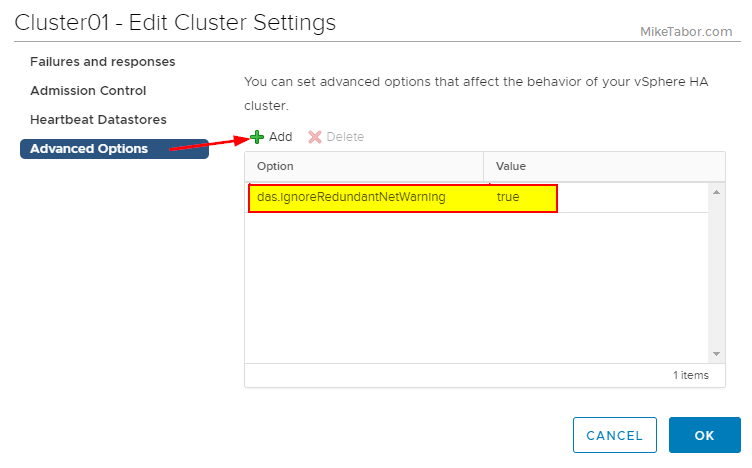
    host no management network redundancy advanced options

With that the warning message is gone. If you do still see the error then try turning HA off and back on or right clicking on each host and selecting Reconfigure for vSphere HA.
Similar Posts

  • How to upgrade vCenter server appliance

    Prior to VMware vCenter Server Appliance 6.x, upgrading or patching vCSA was as simple as a few button clicks in the appliance UI. Gone are those days, as VMware has replaced the appliance UI with a DCUI and the web based install wizard during setup.

    The good news is, upgrading or patching the vCSA 6.x is still pretty simple via the command line!

    Read More “How to upgrade vCenter server appliance”

  • VMware VCP5-DCV Delta Re-certification Exam

    VMware VCP DCV

    Looking to renew your VCP before the March 10th 2015 expiration date? Then the new VMware VCP5-DCV Delta (Exam Code VCP550D) is a cheaper way to renew your VCP without taking the full on exam or not just ready to tackle the VCAP. The new exam covers new material between the vSphere 5.0/5.1 and vSphere 5.5 exams – looking the the blueprints, most noticeably VSAN.

    While you still have to schedule the exam through Pearson VUE, you don’t have to take the course at a testing center and instead can take it online from any device!

    Read More “VMware VCP5-DCV Delta Re-certification Exam”

  • Intel NUC i5 5th Generation an ESXi lab improvement

    Intel NUC BLKNUC5I5MYHE 5th gen

    For the past year and a half I’ve been using the Intel i5 3rd Gen NUC’s in my ESXi home lab with great success. In this time several people have asked if I recommend anything newer, and while Intel had a few 4th gen models I wasn’t really sold on them as most CPU benchmarks put them the same as my 3rd gen or lower and only added support for a 2.5″ drive which at the time I didn’t need but then Intel released news about several Intel NUC 5th generation models!

    Read More “Intel NUC i5 5th Generation an ESXi lab improvement”

  • VMware Update Manager U3e upgrade failing? Un-install it!

    VMware Update Manager U3e error

    I was recently upgrading a VMware environment from vCenter Server Update 3b to Update 3e and during the scheduled change I had also planned on upgrading VMware Update Manager to Update 3e and ran into the following error:

    VMware Workstation unrecoverable error: (vthread-3)
    GetProcAddress: Failed to resolve ENGINE)load_aesni: 127
    You can request support.

    Looking for a possible solution at the VMware Knowledge Base came back with no results and to error message wasn’t overly useful either with “VMware Workstation unrecoverable error: (vthread-3)” as Workstation wasn’t installed on this server.

    Read More “VMware Update Manager U3e upgrade failing? Un-install it!”

  • VMware vCenter Server 5.5b released

    vmware vcenter 5.5b released

    VMware hasn’t let the holidays get in their way and has released vCenter Server 5.5b (Build 1476387) along with vCenter Server Appliance 5.5.0b (Build 1476389). The update includes a number of fixes.

    Resolved Issues in 5.5.0b

    Upgrade and Installation

    • Upgrading the vSphere Web Client to vSphere 5.5 fails with an error
      Attempts to upgrade the vSphere Web Client to vSphere 5.5 fails when they are installed in a custom, non-default location. An error message similar to the following is displayed:

      Error 29107. The service or solution user already registered...

    Read More “VMware vCenter Server 5.5b released”

  • Thank you VMware Community!

    VMware vExpert 2014

    So far, 2014 has been a very rewarding year for a number of reasons, two of which has happened in just a week or two span. First, Eric Siebert (@ericsiebert) announced on March 27th, this years results of the 2014 Top VMware & Virtualization Blog voting. My first year entered into voting and made it to 71st place! A huge thanks goes out to not only Eric but just as much so to everyone who voted for me!

    To top it off, yesterday VMware announced 2014’s first quarter VMware vExpert list. While vExpert isn’t a technical certification or even a general measure of VMware expertise. The VMware judges selected people who were engaged with their community and who had developed a substantial personal platform of influence in those communities. There were a lot of very smart, very accomplished people, even VCDXs, that weren’t named as vExpert this year. VMware awarded this title to 754 people this year and on that list of many impressive names you’ll find yours truly, Michael Tabor!

    I’m both honored and humbled by both lists. It’s a great feeling to be recognized by not only my peers through the voting in the Top vBlog but also by VMware themselves through the vExpert title.

    So again THANK YOU very much to the entire VMware community, a spectacular community indeed, and congratulations to everyone else that made the Top vBlog and vExpert lists!

Leave a Reply

Your email address will not be published. Required fields are marked *

One Comment