Fix VMware VCSA /storage/log filesystem out of disk space

This morning I ran into an issue where users were reporting the production VCSA 6.0 was not allowing them to connect into the web or thick client. Another administrator rebooted the VCSA which seemed to work only briefly. I then logged into the VCSA web management (https://<VCENTER_IP>:5480) and noticed the following health status right away:

The /storage/log filesystem is out of disk space or inodes
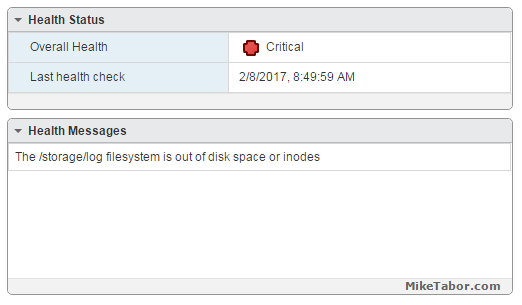
vcsa /storage/log full

So I opened up PuTTY and ran a df -h command and confirmed the issue:
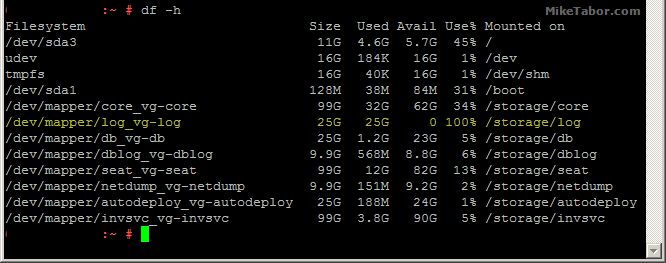
VMware VCSA storage log VMDK full

How to fix VCSA /storage/log filesystem out of disk space

Luckily the fix is rather easy, thanks to a blog post by @lamw that I found while looking for a solution, he mentions in VCSA 6.x you can now expand VMDK’s on the fly since the VCSA takes advantage of LVM.

  1. So open the vSphere client (web or thick) and expand the VMDK (see below table for which VMDK to expand)
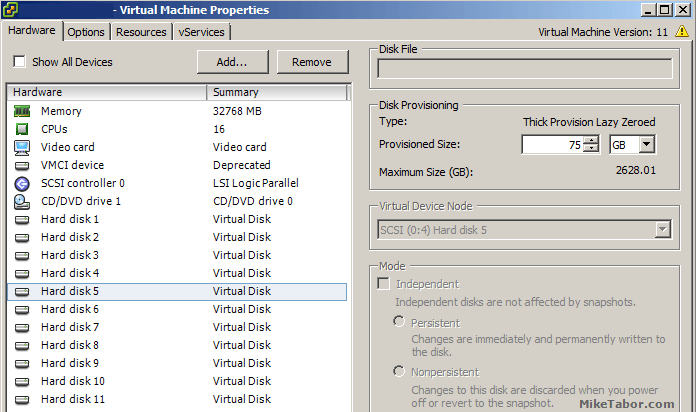
    VCSA /storage/log expand vmdk
  2. Next open PuTTY (or other terminal window) and run the following command on your VCSA
    vpxd_servicecfg storage lvm autogrow
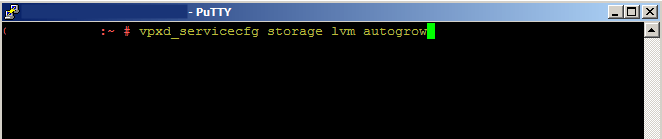
    VCSA /storage/log autogrow vmdk

And that is all there is to it, we now have a healthy VCSA again!
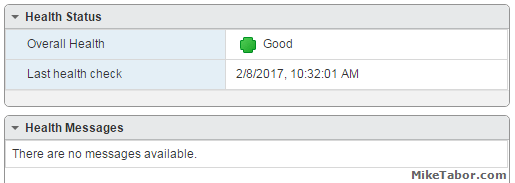
VMware VCSA healthy

VMWare VCSA 6.0 VMDK list and purpose

VMDK Disk Size Mount Point Purpose
VMDK1 12 GB / & /boot Boot
VMDK2 1.3 GB /tmp/mount Temp mount
VMDK3 25 GB SWAP Swap space
VMDK4 25 GB /storage/core Core dumps
VMDK5 10 GB /storage/log System logs
VMDK6 10 GB /storage/db Postgres DB location
VMDK7 5 GB /storage/dblog Postgres DB logs
VMDK8 10 GB /storage/seat Stats, events, and tasks (SEAT) for Postgres
VMDK9 1 GB /storage/netdump Netdump collector
VMDK10 10 GB /storage/autodeploy Auto Deploy repository
VMDK11 5 GB storage/invsvc Inventory service bootstrap and tomcat config

So in the issue above, VMDK disk 5 was expanded and then the autogrow command ran which resolved our issue.

Similar Posts

  • How to fix “SRA command discoverArrays failed” in SRM with RecoverPoint

    Recoverpoint SRA command discoverArrays failed

    We’ve ran into an issue trying to get VMware SRM and SRA 2.2.0.3 along with EMC Recoverpoint 4.1.2 to communicate with one another and would receive this error in SRM:

    SRA command discoverArrays failed. Failed opening session for user to site mgmt IP.

    Please see server logs for further details.

    After some digging around a bit and talking with the Storage Team and EMC we found out that this is due to the SRA’s using HTTP by default and Recoverpoint 4.1.2 does not accept HTTP, but instead only accepts HTTPS or port 443. The steps below is how to get everything to default HTTPS and then communication will resume.

    Read More “How to fix “SRA command discoverArrays failed” in SRM with RecoverPoint”

  • How to install VMware vSphere Update Manager 5.5

    If you don’t already know, VMware Update Manager (aka, VUM) is a tool which allows you to easily automate patching and upgrading VMware hosts as well as virtual machine hardware and VMware tools. It’s a wonderful tool and makes upgrading and patching so much easier and allows you to quickly see how compliant/up-to-date your environment is with the built in pie graph.

    Recently we had some pretty serious array issues which corrupted the VUM database taking Update Manager down. Since we was going to have to rebuild Update Manager I opted to move from Windows Server 2008 to Windows Server 2012, in the steps below I’ll document step by step how to install VMware Update Manager 5.5 on Server 2012 and a separate database.

    Read More “How to install VMware vSphere Update Manager 5.5”

  • VMware vSphere 7 announced

    VMware vSphere 7

    Some pretty big news coming out of VMware today. The announcement of VMware vSphere 7 to become available May 1, 2020! One of the biggest item coming out of this news so far is that vSphere 7 will come in two options.

    The first being vSphere 7 as we all have known it to be for years and then the second being vSphere 7 with Kubernetes which will be available through VMware Cloud Foundation and is a new generation of vSphere for containerized applications.

    Other notables is that the flash based vSphere client is FINALLY no more! From here on out, only the HTML 5 will exist. vCenter Server on Windows will also finally be put to rest and new deployments of vCenter server will be done using the tried and tested vCenter Server Appliance (VCSA) based on PhotonOS linux.

    Read More “VMware vSphere 7 announced”

  • Thank you VMware Community!

    VMware vExpert 2014

    So far, 2014 has been a very rewarding year for a number of reasons, two of which has happened in just a week or two span. First, Eric Siebert (@ericsiebert) announced on March 27th, this years results of the 2014 Top VMware & Virtualization Blog voting. My first year entered into voting and made it to 71st place! A huge thanks goes out to not only Eric but just as much so to everyone who voted for me!

    To top it off, yesterday VMware announced 2014’s first quarter VMware vExpert list. While vExpert isn’t a technical certification or even a general measure of VMware expertise. The VMware judges selected people who were engaged with their community and who had developed a substantial personal platform of influence in those communities. There were a lot of very smart, very accomplished people, even VCDXs, that weren’t named as vExpert this year. VMware awarded this title to 754 people this year and on that list of many impressive names you’ll find yours truly, Michael Tabor!

    I’m both honored and humbled by both lists. It’s a great feeling to be recognized by not only my peers through the voting in the Top vBlog but also by VMware themselves through the vExpert title.

    So again THANK YOU very much to the entire VMware community, a spectacular community indeed, and congratulations to everyone else that made the Top vBlog and vExpert lists!

  • ESXi 5.5 free edition removes 32GB memory limit

    There have been a ton of exciting announcements coming out of VMword 2013, one of which is vSphere 5.5 and all of it’s improvements and additions. Along that note, VMware has changed ESXi 5.5 free version to remove the physical RAM limit which was limited to only 32GB in version 5.1.

    The new virtual hardware, version 10, we can now grow our home labs into more powerful VM’s as most all configuration maximums have been doubled:

    Read More “ESXi 5.5 free edition removes 32GB memory limit”

  • How to create a bootable VMware ESXi installer USB flash drive

    I’ve mentioned how to create a bootable VMware ESXi installer USB flash drive in an older post, but wanted to detail the steps I use to create an ESXi bootable install drive.

    Creating a bootable flash drive is very useful for machines without a CD-Rom or remote access like an iDRAC where you can virtually mount an ISO image – such as the Intel NUC.

    The process is very easy with just one tool needed, Rufus – if you don’t already have it go ahead and download it now!

    Read More “How to create a bootable VMware ESXi installer USB flash drive”

Leave a Reply to Mike Tabor Cancel reply

Your email address will not be published. Required fields are marked *

14 Comments

  1. Hey Mike, you might also want to investigate the cause of that full disk scenario. One such known condition I’ve seen multiple times is caused by incorrect log rotation settings in the sso filesystem. Have a look here to see if you might be suffering the same fate: https://kb.vmware.com/kb/2143565

  2. Total gold! Thanks for an easy explanation. I found that this error was preventing me from upgrading/patching VCSA .