VMware delta exam VCP550D… Passed!
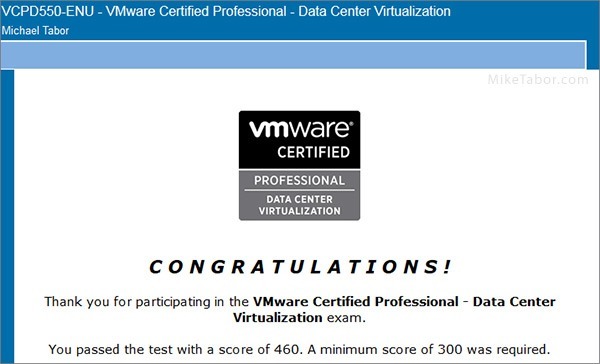
Over the weekend I decided to go ahead and take the VMware Delta VCP550D Exam since my VCP5 was set to expire in March of 2015 due to VMware’s new recertification policy. Even managed to pass it with a fairly decent score of 460 (300 is the minimum to pass). Below I’ll share some of my notes prior and after the exam.
Studying for VCP550 VMware Delta Exam
Back in October when I posted the news about the VMware Delta Exam, a reader asked in the comments what the differences between the VMware 5.1 DCV and 5.5 DCV blueprints were and I replied with a number of differences that stood out to me:
- Identify vCenter Server and vCenter Server database requirements Deploy the vCenter Appliance
- Upgrade a vSphere Distributed Switch
- Upgrade from VMFS3 to VMFS5
- Upgrade VMware Tools
- Upgrade Virtual Machine hardware
- Upgrade an ESXi Host using vCenter Update Manager
- Secure vCenter Server and ESXi (Objective 1.5)
- Configure and Administer Software Defined Storage (VSAN – Objective 3.3) Enable/Configure/Disable Host Power Management/Distributed Power Management Create/Delete vFlash Resource Pool
- Assign vFlash resources to VMDKs
- Install and Configure VMware Data Protection
- Create a backup job with VMware Data Protection
- Install, Configure and Administer vCenter Operations Manager (Objective 7.3)
After taking the VMware Delta Exam I can say this is a VERY good list to study by. I received questions in nearly each of the above subjects along with several of the “general” VCP-DCV exam questions.
Another suggestion I would make would be to take a look at the Pluralsight videos:
Pluralsight offers cheap monthly plans and by using this link you can get a Free 10-day trial!
Overall it felt a lot like taking the VMware VCP-DCV exam all over again, though just a few less questions and shorter time frame to complete as the Delta Exam is 65 questions in 75 minutes vs 85 questions in 90 minutes. I believe I finished the Delta Exam with just about 20 minutes to spare.
If you’re thinking about taking the exam to renew your VCP certification then you better get to it as the Delta exam is only available to take up till November 30, 2014, March 15, 2015, May 8, 2015 so time is of the essence. Get the test registered and get to taking it!
Good luck!
UPDATE: The VCP550 Delta exam has been brought back and is now available to take until March 10, 2015!
UPDATE #2: The VCP550 Delta exam has again been extended, now available until May 8th, 2015!
Thanks for sharing your experience.
Would you know if we will be able to schedule VCAP-DCA [VDCA550] exam if VCP510 expires ?!!
Many thanks for sharing your experience. Short and to the point. Good idea about pluralsight courses.
One minor thing I wanted to point out, the delta exam is available only until March 10, 2015 as per VMware below
https://mylearn.vmware.com/mgrReg/plan.cfm?plan=51919&ui=www_cert
Asim,
You are most welcome. I hope I’m able to help many people with this post.
Thank you for the correction on the date. I’ve updated the post to show the correct date instead of the 15th.
-Michael
Hi, can I ask if this is a online exam? If yes, stupid question but how do they know you don’t have a home lab next to you lol….so you can check your right as you go along!
Matthew,
The Delta exam is an online exam, meaning you can take it from home and do not have to go into a Pearson VUE testing facility to take the exam. That said the types of questions asked I don’t feel having a home lab at the ready would really help you all that much during the exam. So long as you are familiar with the list I posted above you really don’t need anything more than that, but that’s just in my opinion.
-Michael
Today I have just made a request for the VCP 5.5 Delta exam for my re-certification, how come the only available exam dates given by Pearson is 2-Feb-2015? I thought it’s available till 10-March-2015. Any clue on this?
you have 48 hours to take the exam once you pay for it so if you are not ready wait. The first time I did this I did not read the dialogue and it informed me I had not taken within the time-frame..
Thank you for this post, Mike. I passed the exam last week and your advice was quite valuable.
You are very welcome, I happy to have been of some help.
Taking the exam today at 14:00.. :)
Good luck Oddis. Be sure to let us know how you did.
Just passed the VCPD550 a hour ago. They must have just changed the date to May 8th. Cause it was March 10th yesterday, but o well. My certification was good to December. Now I’m good for another 2 years.
Congrats on the exam! VMware did extend the date again just yesterday actually to the new date of May 8th.
-Michael
Hi Mike, I wonder if we still receive a paper certificate and a VMware Workstation license if we pass the VCP550D exam; I di my exam in the first week of February and haven’t received anything until now.
Gerdi
No, you won’t get a paper certificate as this exam is just renewing your previous VCP exam. You can log into your VMware MyLearn portal and print a new certificate of your VCP which will also show the updated expiration date (or VALID THROUGH date).
Also, VMware is not giving free Workstation licenses for the VCP550D exam as they did in the “full” VCP exam.
-Michael
Ok I didn’t know that.
Do you know if the same will count for the VCP6 delta exam?
Hey Michael. Thanks for all your help I know I’ve been bothersome lately but if it wasn’t for you I wouldn’t have gotten this far! So another question I have is, can I use esxi 6.0 for a lab and still study for esxi 5.5 test? I have an evaluation for 6.0 right now and want to use it before it runs out. Thanks again
Absolutely no bother at all my friend!
Ideally it would be best to use a 5.5 lab to study by but vSphere 6.0 isn’t so ground breaking different compared to 5.5 that I believe it wouldn’t cause a huge deal to use 6 as a study for 5.5.
Then again, if you’ve got a vSphere 6 lab is there any reason why you’re not just taking the VCP6 exam instead of 5.5?
-Michael
Yes there is a big reason LOL. $$$. My company has already sent me to the VMWare 5.5 installation class. In order to take 6.0 I would have to go to a whole new class. I wish I didn’t have to because I think its better to learn whats new. I love technology but not enough to burn that much of a whole in my pocket.
Here we present on this most promising occasion. We promised to you that your will pass your certification in first attempt by the help of our dumps. Here we present 20% discount on dumps. What are your waiting for? Avail this offer and pass your exam in first attempt. We provide you 100% passing assurance. Visit us and get latest and accurate dumps. For discount use this coupon code. “VAL20”
VCP550D Practice Test
Full VCP received after August 31,2015 are also no longer receive complimentary VMware workstation license.
Full VCP received after August 31,2015 are also no longer receiving complimentary VMware workstation license.