Intel NUC i5 5th Generation an ESXi lab improvement
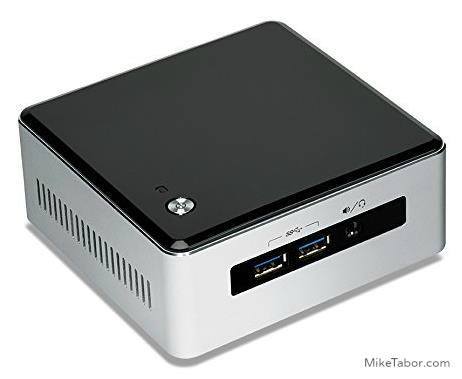
For the past year and a half I’ve been using the Intel i5 3rd Gen NUC’s in my ESXi home lab with great success. In this time several people have asked if I recommend anything newer, and while Intel had a few 4th gen models I wasn’t really sold on them as most CPU benchmarks put them the same as my 3rd gen or lower and only added support for a 2.5″ drive which at the time I didn’t need but then Intel released news about several Intel NUC 5th generation models!
The model I feel is best suited for a VMware ESXi home lab is the new Intel i5 NUC NUC5i5MYHE. The i5-5300U NUC5i5MYHE first and most importantly for me comes with vPro, something none of the 4th generation models offered and the NUC5i5MYHE is the only 5th generation model currently that does offer it.
If you’re not already familiar, vPro offers the ability to remote access into the machine similar to a KVM and since my NUC’s are located at the top of a closest it makes managing them much easier.
In addition the i5-5300U CPU is the first CPU to offer any kind of decent benchmarking upgrade (3,900) over the i5-3427U CPU (3,500) in my 3rd generation NUC. Most other NUCs since have benchmarked considerably lower than the vPRO models like the 3rd generation i5-3427U CPU that I currently use.
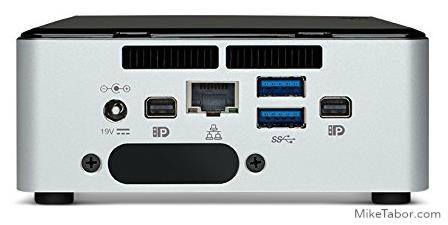
The other benefits of the Intel i5-5300U NUC NUC5i5MYHE is that Intel replaced the mSATA slot with M.2 slot which increases the bandwidth from 3Gbps to 6Gbps giving the NUC a nice IOPS increase and having the additional 2.5″ drive capability would certainly come in use now with VMware VSAN. Also all external USB ports have been replaced with 3.0 USB (4 in total) where as the 3rd gen model only had two 3.0 USB ports.
There are a couple other very minor upgrades like the improved Intel HD 5500 graphics and the replaceable lid to extend the NUC capabilities such as adding additional USB ports, TV Tuners, wireless charging station, none of which would be of any use as an ESXi server.
On the flip side, the same negatives still apply; the Intel NUC’s are still limited to 16GB RAM and comes with only one network adapter. While it would be nice to have more RAM or an additional NIC, neither have been a huge problem for me in my home lab setup.
Overall this is the only model I would recommend over the 3rd generation NUC and one I’m looking forward to trying very soon. ;)

I just picked up one of these as an “alternative” workstation; in my setup, I have one rack for dedicated serving and two racks with workstations that can double as VM hosts; essentially I exploit the Hyper V management OS (“VM0”) as a workstation and live migrate as needed. In any case, if I neither need more VMs nor am doing large visual composite work, instead of firing up an additional 100-200W on a poorly wired circuit, I use one of these. I’m either adding a second 5i5MYHE or the older 53427, as I can’t stand not having OOB management or TPM/FDE.
There are a couple of minor technical errors in your write up: you already have SATA 6Gbps with the 3rd gen mSATA port; on the new 5I5 what you get is two M.2 type B keyed slot which can take x2 PCIe cards (if x4 they must be B+M keyed – unlike the Samsung 941 I initally ordered) as well as being compatible with the many AHCI/SATA3 (sort of conflating an issue, but you get it) drives that have been put in an M.2 form factor. One slot is 42mm, the other 80mm. In *addition* to that there is a single SATA3 port on the board, so if you forgo the “intended” wifi use, you can have three drives out of the box. The 53427 has only one USB3 port (external) while the 5I5M has four (all its external ports).
And in *addition* to that, there is a barely noticed ribbon port, unmentioned in any review I’ve seen, but fascinating in possibilities…. hidden in the docs – an external “custom” PCIe x4 header.
Check out the block diagram and the technical integrator datasheets on ARK. The 5th gen hides a lot of interfaces on its board, some with headers, some without…
I was thinking about getting the i3 version of this NUC to save some money. What do I loose out on compared to the I5 in regards to vPro? Thank you!
WitchDoctor,
With the i3 version you’ll lose the vPro ability like you mentioned. You’ll also get a slower clock speed, no Turbo boost technology, and the results are lower benchmark numbers compared to both i5 models (with or without vPro, vPro offering the best numbers).
If vPro isn’t something that interests you and you don’t think you’ll need the extra horse power then an i3 might work just fine for you. Let us know what you get!
-Michael
Michael, thank you for responding. I guess my biggest question is what does not having vPro limit me too. I don’t care so much the speed.
Thanks.
Without vPro you’ll need to attach a keyboard, mouse, and monitor or a KVM to be able to remotely access your “host”. In my case where my machines are at the top of a closest it makes it much easier for me to access these machines if I need to. If the host is going to be in easy reach then vPro isn’t going to be a huge deal for you.
-Michael
Michael, Great that makes sense. I guess with ESXI, how often would I need to access it since everything is usually done through the client/web app right?
WitchDoctor,
It all depends really. Access is needed if you want to update the BIOS or want to re-install ESXi – which I typically do on most of my hosts for each new version release. I also rebuild my lab a lot as I’m playing with things. In theory you could perform an install (using a monitor) then for all other upgrades use the command line when wouldn’t need the monitor. So it really all depends on how you manage your lab.
-Michael
Michael, Thank you so much for the information. Sorry for taking up your time. One last thing, is VMware sever appliance needed for the 550 test? Unfortunately I am not allowed to download it for some reason and hoping it does hurt me in the end. Thanks much.
No need to apologize, I’m very happy to help.
There may be questions about the appliance on the test but nothing that isn’t already mentioned on the blueprint. I don’t believe not having it running in a lab will hurt you in the least on the exam. Good luck taking the test!
-Michael
Thanks a bunch. I purchased the I3 version. It was pretty much $120 bucks cheaper and I am only using it to learn vmware and linux so I think it should be sufficient.
WitchDoctor,
You are welcome! Good luck on the exam.
-Michael
Hey Michael, I got the 5i5 nuc but for some reason the NIC is not found. Do you know where the .vib file can be found for this NIC?
WitchDoctor,
Take a look at this post, it should help you out. https://miketabor.com/esxi-5-fails-install-intel-nuc-error-no-network-adapters/
-Michael
Michael, Thanks for the help but I believe the 4th Gen NIC is different from the 5th Gen. I will try this one again and see what will happen but it seems I already had this file.
WitchDoctor,
Have you tried version 2 of the drviers listed in that blog post?
Also what version of ESXi are you installing? When I re-did my lab using ESXi 6 I did not need to inject NIC drivers, ESXi already had them.
-Michael
Hi, I’m ordering one NUC5i5MYBE, and was about to make the type-M (XP941) vs type-B (the slot type of the MYBE) mistake for the pcie ssd card: which type of SSD card have you chosen ? I see there aren’t that much to choose from. Thanks.
Great article!
What do you think about the new 5I7RYH?
Thanks Levente!
The 5I7RYH are nice units and would also make a great ESXi host for home lab use. Keep in mind that model does NOT include vPro as like the models I use or the newer 5i5MYHE. So if that doesn’t matter to you then the i-7 model is great!
-Michael