How to add Realtek R8168 to ESXi 5.5 Update 2 ISO

Realtek

Over the past weekend I was working on a whitebox ESXi host and wanted to upgrade it to ESXi 5.5 Update 2 from an older version of ESXi 5.1 using a realtek R8168 network card. While I could have performed an in place upgrade, such as via command line, a clean install was preferred. However, VMware has removed a number of NIC drivers from ESXi 5.x and trying to install with the base ESXi image would result in a “No Network Adapters” error during install.

In order to do a clean install you have to re-add the Realtek R8168 NIC drivers back into the ESXi 5.5 image, otherwise a NIC will not be found and thus ESXi will not install. These are the steps to easily re-add the Realtek R8168 drivers into ESXi 5.5 ISO by making a custom ESXi 5.5 image.

Install ESXi 5.5 Update 2 with Realtek R8168 NIC

The Realtek R8168 drivers was packaged into ESXi prior to 5.5 and those drivers worked just fine. So the easiest method is to just take the Realtek R8168 NIC drivers from the VMware ESXi 5.1 Offline Bundle zip file.

esxi 5.1 update2 offline bundle

Once you’ve downloaded the bundle file you can then locate the driver at “vib20/net-r8168” folder, the file name is:
VMware_bootbank_net-r8168_8.013.00-3vmw.510.0.0.799733.vib

Alternatively I’ve also added the driver to my site, download the Realtek R8168 .vib driver here. Simply copy the .VIB file to your location of choice, such as your desktop.

The next tool you will need is ESXi-Customizer. This is the same tool I used to add the needed Intel NIC drivers for my Intel NUC esxi home lab. Once you’ve downloaded ESXi Customizer go ahead and extract and run it.

Configuring ESXi-Customizer

  1. Tell ESXi-Customizer where your original ESXi 5.5 Update 2 ISO is located.
  2. The next box it to tell ESXi-Customizer where the Realtek R8168 .VIB driver is located.
  3. Finally, tell ESXi-Customizer where you want the customized ISO image to be saved to and click Run.
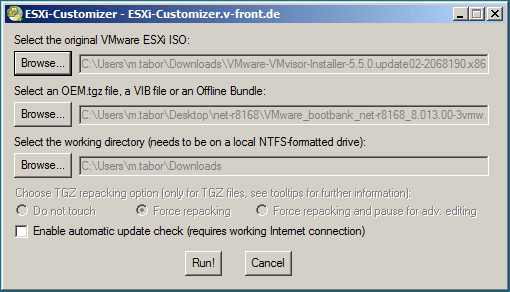
ESXi customizer injecting Realtek 8168 NIC drivers

ESXi-Customizer is very quick and took about 20-30 seconds to inject the drivers into the standard ISO image and create a new customized ESXi 5.5 iso with the Realtek R8168 drivers included.
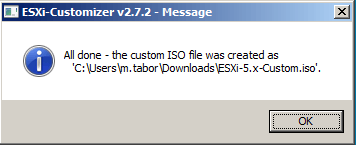
esxi customizer complete

Now simply mount the new ESXi 5.5 customized ISO via KVM (iDRAC, iLO, etc), burn it to CD, or copy the image to a USB drive and you’re ready to go. ESXi will have the needed Realtek NIC driver and ESXi will install without issue.
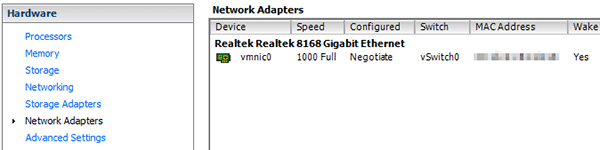
ESXi network adapter

Back in business using ESXi 5.5 Update 2 and a Realtek R8168 network card!
Similar Posts

  • My VMware ESXi Home Lab Upgrade

    Although the focus in my career right now is certainly more cloud focused in Amazon Web Services and Azure, I still use my home lab a lot.

    For the last 5+ years my home lab had consisted of using 3x Intel NUC’s (i5 DC53427HYE), a Synology NAS for shared storage and an HP ProCurve switch. This setup served me well for most of those years. It has allowed me to get many of the certifications I have, progress in my career and have fun as well.

    At the start of this year I decided it was time to give the home lab an overhaul. At first I looked at the newest generation of Intel NUC’s but really wasn’t looking forward to dropping over $1,300 on just partial compute (I’d still need to be RAM for each of the 3 NUC’s). I also wanted something that just worked, no more fooling around with network adapter drivers or doing this tweak or that tweak.

    I also no longer needed to be concerned about something that had a tiny footprint. I also questioned if I really needed multiple physical ESXi hosts. My home lab isn’t running anything mission critical and if I really wanted I could always build additional nested VMware ESXi hosts on one powerful machine if I needed.

    So in the end, the below is what I settled on. Replacing all of my compute, most of my networking and adding more storage!

    Read More “My VMware ESXi Home Lab Upgrade”

  • HTML5 Embedded Host Client, this looks promising

    It’s no secret many people have really disliked the vSphere web client, it’s very sluggish, clunky, and based on flash (flash comes with it’s own security issues). It was rumored and highly hoped that vSphere 6 might be re-written in HTML5, but sadly this didn’t and hasn’t happened yet. While vSphere 6 did improve a bit on the web client the issues many people have had with it in the past still remain today.

    Enter the VMware HTML5 Embedded Host Client fling. I’ve been using and following this fling for a while now and have really enjoyed it and with each release it keeps getting better and better.

    The Embedded Host Client fling is based on HTML5 which allows it works great across all kinds of platforms, it’s fast, responsive, and doesn’t require any plug-ins – YES the VM console works great. If this happens to be a look of what’s to come in a new VMware vSphere web client, then a client is looking very promising!

    If you haven’t tried it yet, you should. It’s extremely easy to install and doesn’t even require a reboot just follow these simple instructions.

    Read More “HTML5 Embedded Host Client, this looks promising”

  • Synology DSM 5.1-5021 update released

    Synology

    Synology released DSM 5.1-5021 update as well as Cloud Station 3.1-3320 today. This update includes all the updates since 5.1-5004 as well as fixes for a number of vulnerabilities in PHP, OpenVPN, and other security improvements. DSM 5.1-5004 also improves Amazon S3 backup stability along with a number of other fixes and improvements.

    Read More “Synology DSM 5.1-5021 update released”

  • VMUG EVALExperience, the new VMware VMTN

    VMUG EVALExperience

    Long ago VMware offered a program called VMware Technology Network (VMTN) which was very similar to Microsoft’s TechNet, which allowed you to download and run various VMware software within your home lab for a small yearly fee. Just like the Microsoft TechNet, the VMware VMTN program was eventually closed. From the time the VMTN program closed many people have begged and pleaded with VMware to bring the program back, there is even a long forum thread asking VMware to bring VMTN back. Though it never did… until now.

    Read More “VMUG EVALExperience, the new VMware VMTN”

  • Restore a VM using the {vm}-flat.vmdk file

    missing vmdk file error

    A couple days ago I was asked the question “An admin deleted the vmdk file associated with a VM, there are no snapshots or backups of the VM . Can we restore this VM somehow?“. I believe in backups, I like to have my VM’s backed up so that I can depend on them for events just like this very issue. At first I was stumped, until the {vm-name}.flat.vmdk was mentioned. That’s when I remembered a method to recover a VM using the vm-flat.vmdk file that I had actually done 2-3 years ago.

    Read More “Restore a VM using the {vm}-flat.vmdk file”

  • How to easily add an ESXi SSH login message banner

    ESXi issues message

    Preparing for some upcoming audits, I noticed one of the checkpoints was to ensure each ESXi host was configured with a warning banner stating the machine is being monitored and audited when someone logs into the ESXi host via SSH. This type of message is something you see on most any company or government computer before you login.

    There are two message types that can be used to achieve this, the first being login banner (/etc/issue) and MOTD (/etc/motd). The difference between the two are where they are shown. The login banner is shown between the username and password inputs during login, while the MOTD is displayed after a user has successfully logged into SSH.

    Read More “How to easily add an ESXi SSH login message banner”

Leave a Reply to Michael Cancel reply

Your email address will not be published. Required fields are marked *

15 Comments

  1. Hello Mike,
    Do you have a .vib file from ESXi 5.1 Offline Bundle for Realtek 8111 drivers (C, D, E, etc)?
    Thanks so much,
    Bret

    1. Bret,

      I believe the Realtek 8111 drivers are the same family as the 8168 drivers and “should” work with the 8111 NIC’s. Are you getting an error message?

      -Michael

  2. Hi, this is an excellent fix but have you had issue trying to scp files over ?
    mine seems to drop out if using this driver, I got a new nic but interested to know if you have a fix or experience the same issue ? seems like when I try to scp a file larger than 2gb it fails or anything above 800mb the speeds fluctuate to much and then stalls.

    have you seen this ?
    Thanks
    Frank

  3. Where can I get the ISO? I downloaded ESXi 5.5 Update 2 from VMware, but it’s not an ISO file. Can this zip be converted into the needed ISO?

      1. Thanks for your response. However, when I go there, it won’t allow me to download anything. It says I have to download a trial.

  4. With ESXi customizer I noticed that for Windows 10 I get the error that my windows version is not supported and it exits the script.
    If you get the same error, open the CMD with notepad or any other pure text editor and change the line:

    if “!WinVer!” LSS “5.1” call :earlyFatal Unsupported Windows Version: !WinVer!. At least Windows XP is required & exit /b 1

    to

    if “!WinVer!” LSS “5.1” call :logcons — : !WinVer!. At least Windows XP is required .. but your on some unsupported version I am going to assume.

    This will disable the message and continue to work