How to add Realtek R8168 to ESXi 5.5 Update 2 ISO

Realtek

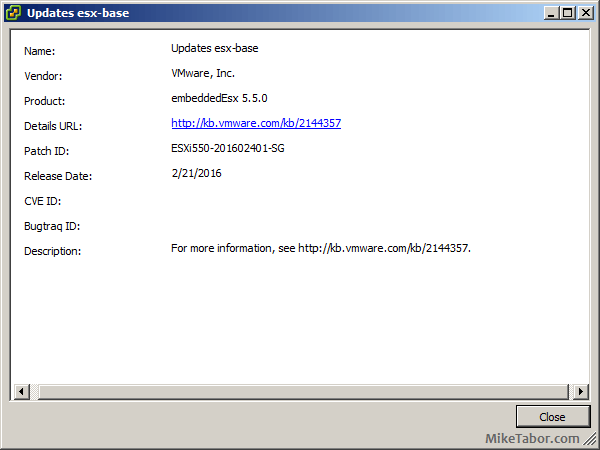
Over the past weekend I was working on a whitebox ESXi host and wanted to upgrade it to ESXi 5.5 Update 2 from an older version of ESXi 5.1 using a realtek R8168 network card. While I could have performed an in place upgrade, such as via command line, a clean install was preferred. However, VMware has removed a number of NIC drivers from ESXi 5.x and trying to install with the base ESXi image would result in a “No Network Adapters” error during install.

In order to do a clean install you have to re-add the Realtek R8168 NIC drivers back into the ESXi 5.5 image, otherwise a NIC will not be found and thus ESXi will not install. These are the steps to easily re-add the Realtek R8168 drivers into ESXi 5.5 ISO by making a custom ESXi 5.5 image.

Install ESXi 5.5 Update 2 with Realtek R8168 NIC

The Realtek R8168 drivers was packaged into ESXi prior to 5.5 and those drivers worked just fine. So the easiest method is to just take the Realtek R8168 NIC drivers from the VMware ESXi 5.1 Offline Bundle zip file.

esxi 5.1 update2 offline bundle

Once you’ve downloaded the bundle file you can then locate the driver at “vib20/net-r8168” folder, the file name is:
VMware_bootbank_net-r8168_8.013.00-3vmw.510.0.0.799733.vib

Alternatively I’ve also added the driver to my site, download the Realtek R8168 .vib driver here. Simply copy the .VIB file to your location of choice, such as your desktop.

The next tool you will need is ESXi-Customizer. This is the same tool I used to add the needed Intel NIC drivers for my Intel NUC esxi home lab. Once you’ve downloaded ESXi Customizer go ahead and extract and run it.

Configuring ESXi-Customizer

  1. Tell ESXi-Customizer where your original ESXi 5.5 Update 2 ISO is located.
  2. The next box it to tell ESXi-Customizer where the Realtek R8168 .VIB driver is located.
  3. Finally, tell ESXi-Customizer where you want the customized ISO image to be saved to and click Run.
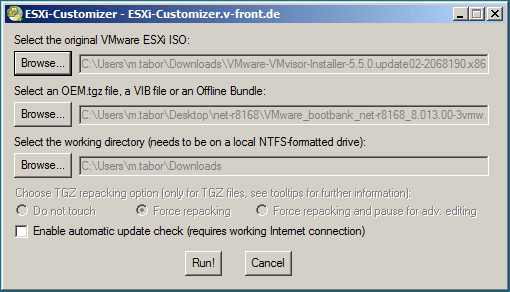
ESXi customizer injecting Realtek 8168 NIC drivers

ESXi-Customizer is very quick and took about 20-30 seconds to inject the drivers into the standard ISO image and create a new customized ESXi 5.5 iso with the Realtek R8168 drivers included.
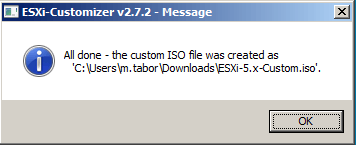
esxi customizer complete

Now simply mount the new ESXi 5.5 customized ISO via KVM (iDRAC, iLO, etc), burn it to CD, or copy the image to a USB drive and you’re ready to go. ESXi will have the needed Realtek NIC driver and ESXi will install without issue.
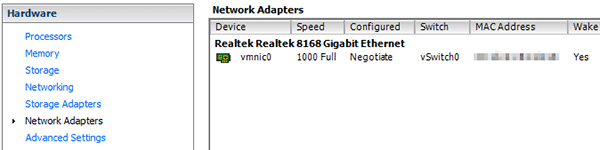
ESXi network adapter

Back in business using ESXi 5.5 Update 2 and a Realtek R8168 network card!
Similar Posts

  • VMware ESXi 5 home lab upgrade

    In the past I’ve been using a single server to run my VMware ESXi home lab. it was slow, old, big and loud. I’ve been meaning to upgrade my home lab for a while and just never got around to it, until now! When looking for new hardware I wanted the servers to be as compact as possible, quiet, and low energy usage as possible while still having some horsepower.

    I debated on going the whitebox solution as I build all my own desktops anyway, I also looked at several other solutions such as the HP ML310e server, Shuttle XH61V barebones machine, but ultimately decided to go with two Intel NUC i5’s.

    Intel NUC i5 and 16GB ram

    Intel NUC i5 DC53427HYE Features:

    • Uses very little energy
    • Completely quiet
    • Supports up to 16GB RAM
    • A dual core CPU that scores nearly 3,600 in PassMark benchmarking
    • Includes vPro which allows me to easily run both NUC’s headless
    • Extremely small, nearly 4 1/2″ inch square footprint

    Read More “VMware ESXi 5 home lab upgrade”

  • Restore a VM using the {vm}-flat.vmdk file

    missing vmdk file error

    A couple days ago I was asked the question “An admin deleted the vmdk file associated with a VM, there are no snapshots or backups of the VM . Can we restore this VM somehow?“. I believe in backups, I like to have my VM’s backed up so that I can depend on them for events just like this very issue. At first I was stumped, until the {vm-name}.flat.vmdk was mentioned. That’s when I remembered a method to recover a VM using the vm-flat.vmdk file that I had actually done 2-3 years ago.

    Read More “Restore a VM using the {vm}-flat.vmdk file”

  • Setup Synology Syslog server for VMware ESXi

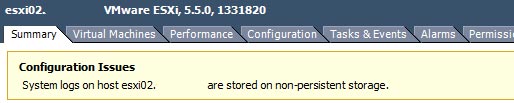
    After performing my home lab upgrade, ESXi now runs from a USB stick and because of that vSphere would complain that the system logs where on non-persistent storage:

    ESXi syslog error

    If I wanted I could have ran the vCenter Server Appliance (vCSA) as it comes with it’s own syslog server, or I could have used something like KIWI or Splunk to be my syslog server. I instead went the route of my Synology NAS as it too has the ability to act as a syslog server and these are the steps I performed to setting it up.

    Read More “Setup Synology Syslog server for VMware ESXi”

  • My VMware ESXi Home Lab Upgrade

    Although the focus in my career right now is certainly more cloud focused in Amazon Web Services and Azure, I still use my home lab a lot.

    For the last 5+ years my home lab had consisted of using 3x Intel NUC’s (i5 DC53427HYE), a Synology NAS for shared storage and an HP ProCurve switch. This setup served me well for most of those years. It has allowed me to get many of the certifications I have, progress in my career and have fun as well.

    At the start of this year I decided it was time to give the home lab an overhaul. At first I looked at the newest generation of Intel NUC’s but really wasn’t looking forward to dropping over $1,300 on just partial compute (I’d still need to be RAM for each of the 3 NUC’s). I also wanted something that just worked, no more fooling around with network adapter drivers or doing this tweak or that tweak.

    I also no longer needed to be concerned about something that had a tiny footprint. I also questioned if I really needed multiple physical ESXi hosts. My home lab isn’t running anything mission critical and if I really wanted I could always build additional nested VMware ESXi hosts on one powerful machine if I needed.

    So in the end, the below is what I settled on. Replacing all of my compute, most of my networking and adding more storage!

    Read More “My VMware ESXi Home Lab Upgrade”

  • Power off an unresponsive VM using ESXTOP

    Just recently we have some hardware issues in our primary datacenter and during that time had a few VM’s that became unresponsive and needed to get them back online. The VM’s had stopped responding to the normal vSphere commands to reboot, shutdown or even restart. I didn’t want to power cycle the entire ESXi host and instead just power off an unresponsive VM.

    Here is a quick and easy way to do just that using ESXTOP.

    Read More “Power off an unresponsive VM using ESXTOP”

  • How to install VMware vCenter Log Insight

    VMware vCenter Log Insight

    Log Insight is a real-time log management and analytics solution, and one of VMware’s newest product. Log Insight was recently updated to version 2.0 and available to download here.

    Below we’ll go through the steps to installing VMware Log Insight and you’ll soon see just how easy it is to get Log Insight up and running.

    Read More “How to install VMware vCenter Log Insight”

Leave a Reply to Frank Cancel reply

Your email address will not be published. Required fields are marked *

15 Comments

  1. Hello Mike,
    Do you have a .vib file from ESXi 5.1 Offline Bundle for Realtek 8111 drivers (C, D, E, etc)?
    Thanks so much,
    Bret

    1. Bret,

      I believe the Realtek 8111 drivers are the same family as the 8168 drivers and “should” work with the 8111 NIC’s. Are you getting an error message?

      -Michael

  2. Hi, this is an excellent fix but have you had issue trying to scp files over ?
    mine seems to drop out if using this driver, I got a new nic but interested to know if you have a fix or experience the same issue ? seems like when I try to scp a file larger than 2gb it fails or anything above 800mb the speeds fluctuate to much and then stalls.

    have you seen this ?
    Thanks
    Frank

  3. Where can I get the ISO? I downloaded ESXi 5.5 Update 2 from VMware, but it’s not an ISO file. Can this zip be converted into the needed ISO?

      1. Thanks for your response. However, when I go there, it won’t allow me to download anything. It says I have to download a trial.

  4. With ESXi customizer I noticed that for Windows 10 I get the error that my windows version is not supported and it exits the script.
    If you get the same error, open the CMD with notepad or any other pure text editor and change the line:

    if “!WinVer!” LSS “5.1” call :earlyFatal Unsupported Windows Version: !WinVer!. At least Windows XP is required & exit /b 1

    to

    if “!WinVer!” LSS “5.1” call :logcons — : !WinVer!. At least Windows XP is required .. but your on some unsupported version I am going to assume.

    This will disable the message and continue to work