How to add Realtek R8168 to ESXi 5.5 Update 2 ISO

Realtek

Over the past weekend I was working on a whitebox ESXi host and wanted to upgrade it to ESXi 5.5 Update 2 from an older version of ESXi 5.1 using a realtek R8168 network card. While I could have performed an in place upgrade, such as via command line, a clean install was preferred. However, VMware has removed a number of NIC drivers from ESXi 5.x and trying to install with the base ESXi image would result in a “No Network Adapters” error during install.

In order to do a clean install you have to re-add the Realtek R8168 NIC drivers back into the ESXi 5.5 image, otherwise a NIC will not be found and thus ESXi will not install. These are the steps to easily re-add the Realtek R8168 drivers into ESXi 5.5 ISO by making a custom ESXi 5.5 image.

Install ESXi 5.5 Update 2 with Realtek R8168 NIC

The Realtek R8168 drivers was packaged into ESXi prior to 5.5 and those drivers worked just fine. So the easiest method is to just take the Realtek R8168 NIC drivers from the VMware ESXi 5.1 Offline Bundle zip file.

esxi 5.1 update2 offline bundle

Once you’ve downloaded the bundle file you can then locate the driver at “vib20/net-r8168” folder, the file name is:
VMware_bootbank_net-r8168_8.013.00-3vmw.510.0.0.799733.vib

Alternatively I’ve also added the driver to my site, download the Realtek R8168 .vib driver here. Simply copy the .VIB file to your location of choice, such as your desktop.

The next tool you will need is ESXi-Customizer. This is the same tool I used to add the needed Intel NIC drivers for my Intel NUC esxi home lab. Once you’ve downloaded ESXi Customizer go ahead and extract and run it.

Configuring ESXi-Customizer

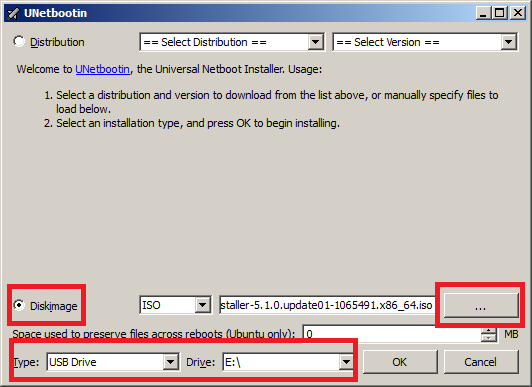
  1. Tell ESXi-Customizer where your original ESXi 5.5 Update 2 ISO is located.
  2. The next box it to tell ESXi-Customizer where the Realtek R8168 .VIB driver is located.
  3. Finally, tell ESXi-Customizer where you want the customized ISO image to be saved to and click Run.
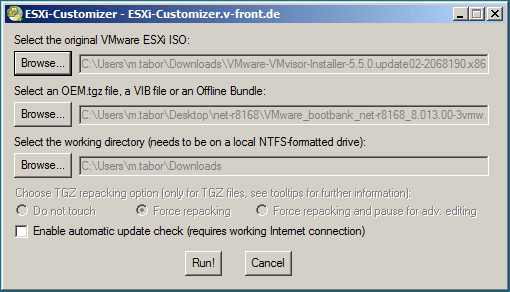
ESXi customizer injecting Realtek 8168 NIC drivers

ESXi-Customizer is very quick and took about 20-30 seconds to inject the drivers into the standard ISO image and create a new customized ESXi 5.5 iso with the Realtek R8168 drivers included.
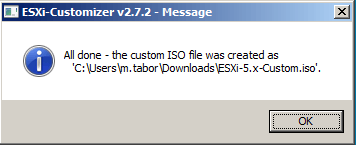
esxi customizer complete

Now simply mount the new ESXi 5.5 customized ISO via KVM (iDRAC, iLO, etc), burn it to CD, or copy the image to a USB drive and you’re ready to go. ESXi will have the needed Realtek NIC driver and ESXi will install without issue.
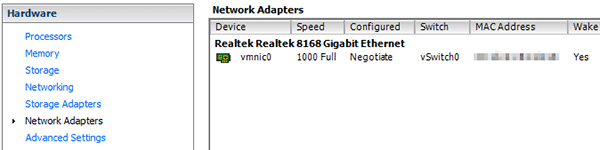
ESXi network adapter

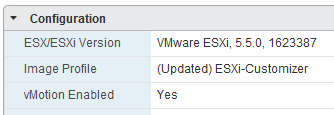
Back in business using ESXi 5.5 Update 2 and a Realtek R8168 network card!
Similar Posts

  • Crucial 16GB memory, perfect for Intel NUC

    crucial 16gb 204pin memory

    I’m a huge fan the of Intel NUC‘s for a VMware home lab. In fact I just recently picked up my third Intel NUC to give me more head room for a small VMware Horizon (View) environment at home.

    I typically use G.Skill memory in my NUC’s as I’ve had great luck with the brand in my desktop and laptop for years. However G.Skill has been increasing in price which made me look around for alternatives and came across Crucial DDR3 204-pin memory for less money, but days after I purchased it they too went up in price. However they are now back on sale and cost about $50 less then the G.Skill memory I have been using in my first two NUC’s.

    I’ve been using the Crucial memory now for the last several months without any problems and even though they are rated at a lower voltage I can’t say I really see any difference in power savings or consumption compared to the G.Skill 1.5V. If you’re looking to upgrade now might be a good time to take advantage of the sale price.

  • vSphere 5.5 Update 1 has been released, includes VSAN.

    VMware vSphere 5.5 update 1

    VMware has officially released vSphere 5.5 U1 which includes a number of improvements, fixes, and most excitedly the production ready version of VSAN!

    What’s new

    • vCloud Hybrid Service vSphere Client Plug-in, is now available in vSphere Web Client.
    • vCenter Server is now supported on Windows Server 2012 R2.
    • A number of resolved issues

    Read More “vSphere 5.5 Update 1 has been released, includes VSAN.”

  • My VMware ESXi Home Lab Upgrade

    Although the focus in my career right now is certainly more cloud focused in Amazon Web Services and Azure, I still use my home lab a lot.

    For the last 5+ years my home lab had consisted of using 3x Intel NUC’s (i5 DC53427HYE), a Synology NAS for shared storage and an HP ProCurve switch. This setup served me well for most of those years. It has allowed me to get many of the certifications I have, progress in my career and have fun as well.

    At the start of this year I decided it was time to give the home lab an overhaul. At first I looked at the newest generation of Intel NUC’s but really wasn’t looking forward to dropping over $1,300 on just partial compute (I’d still need to be RAM for each of the 3 NUC’s). I also wanted something that just worked, no more fooling around with network adapter drivers or doing this tweak or that tweak.

    I also no longer needed to be concerned about something that had a tiny footprint. I also questioned if I really needed multiple physical ESXi hosts. My home lab isn’t running anything mission critical and if I really wanted I could always build additional nested VMware ESXi hosts on one powerful machine if I needed.

    So in the end, the below is what I settled on. Replacing all of my compute, most of my networking and adding more storage!

    Read More “My VMware ESXi Home Lab Upgrade”

  • Microsoft’s Convenience Update breaks VMware VMXNet3 vNICs

    Microsoft recently pushed out a “Convenience Update“, a sort of rollup of rollups for Windows Server 2008 R2 SP1 and Windows 7 machines. This “Convenience Update” however comes with an incompatibility issue with VMware virtual machines that are using VMXNet3 network adapters, which causes the network to become unresponsive.

    Read More “Microsoft’s Convenience Update breaks VMware VMXNet3 vNICs”

  • VMware ESXi 6.0 CBT bug fix released

    VMware

    You may remember ESXi 4.x-5.x had a CBT bug, as mentioned here, that could potentially cause your backups to be pretty useless. Well it seems ESXi 6.0 isn’t without it’s own CBT bug which could cause the following to possibly occur:

    • Backing up a VM with CBT enabled fails.
    • Powering on virtual machines fails.
    • Expanding the size of a virtual disk fails.
    • Taking VM quiesced snapshots fails.

    Prior to the fix, the workaround was to disable CBT. Thankfully VMware has released a fix for the ESXi 6.0 CBT bug and it’s recommended that anyone who uses CBT apply this patch regardless if it was a clean install of VMware ESXi 6.0 or an upgrade to ESXi 6.0.

    Read More “VMware ESXi 6.0 CBT bug fix released”

  • Easy ESXi 5.5 upgrade via command line

    ESXi 5.5 was just released general availability (GA) on Sunday (9/22) and I’m itching to upgrade the home lab to run the latest version with all it’s goodies. I wanted to try upgrading my hosts without having to go through the same process that I followed setting up ESXi on the NUC in the first place, injecting custom NIC drivers, etc.

    Enter the command line…

    1. Move all VM’s from the host and then put the host into Maintenance Mode.
    2. Go to the Configuration tab > Security Profile and Enable SSH under Services.
      ssh enabled
    3. Under Firewall, enable httpClient (outbound http).
      httpClient enable
    4. Open PuTTY (or other SSH client) and SSH into your host.
    5. Read More “Easy ESXi 5.5 upgrade via command line”

Leave a Reply to Michael Cancel reply

Your email address will not be published. Required fields are marked *

15 Comments

  1. Hello Mike,
    Do you have a .vib file from ESXi 5.1 Offline Bundle for Realtek 8111 drivers (C, D, E, etc)?
    Thanks so much,
    Bret

    1. Bret,

      I believe the Realtek 8111 drivers are the same family as the 8168 drivers and “should” work with the 8111 NIC’s. Are you getting an error message?

      -Michael

  2. Hi, this is an excellent fix but have you had issue trying to scp files over ?
    mine seems to drop out if using this driver, I got a new nic but interested to know if you have a fix or experience the same issue ? seems like when I try to scp a file larger than 2gb it fails or anything above 800mb the speeds fluctuate to much and then stalls.

    have you seen this ?
    Thanks
    Frank

  3. Where can I get the ISO? I downloaded ESXi 5.5 Update 2 from VMware, but it’s not an ISO file. Can this zip be converted into the needed ISO?

      1. Thanks for your response. However, when I go there, it won’t allow me to download anything. It says I have to download a trial.

  4. With ESXi customizer I noticed that for Windows 10 I get the error that my windows version is not supported and it exits the script.
    If you get the same error, open the CMD with notepad or any other pure text editor and change the line:

    if “!WinVer!” LSS “5.1” call :earlyFatal Unsupported Windows Version: !WinVer!. At least Windows XP is required & exit /b 1

    to

    if “!WinVer!” LSS “5.1” call :logcons — : !WinVer!. At least Windows XP is required .. but your on some unsupported version I am going to assume.

    This will disable the message and continue to work